Overseas AI Robot Computing Power Investment System Setup: Multi-Language Compound Interest Investment Platform with JAVA Development Full Deployment Guide
Overseas AI Robot Computing Power Investment System Setup: Multi-Language Compound Interest Investment Platform with JAVA Development Full Deployment Guide
Last month I helped a fintech startup launch an overseas AI robot computing power investment system. The API backend uses JAVA, the desktop frontend uses VUE, and the mobile frontend uses uniapp. The system supports multi-language switching and compound interest calculations for computing power investments. This was one of the more technically complex projects I have worked on, and I ran into several JAVA memory management issues during deployment. Here is the complete setup guide based on my hands-on experience.
1. System Overview and Core Features
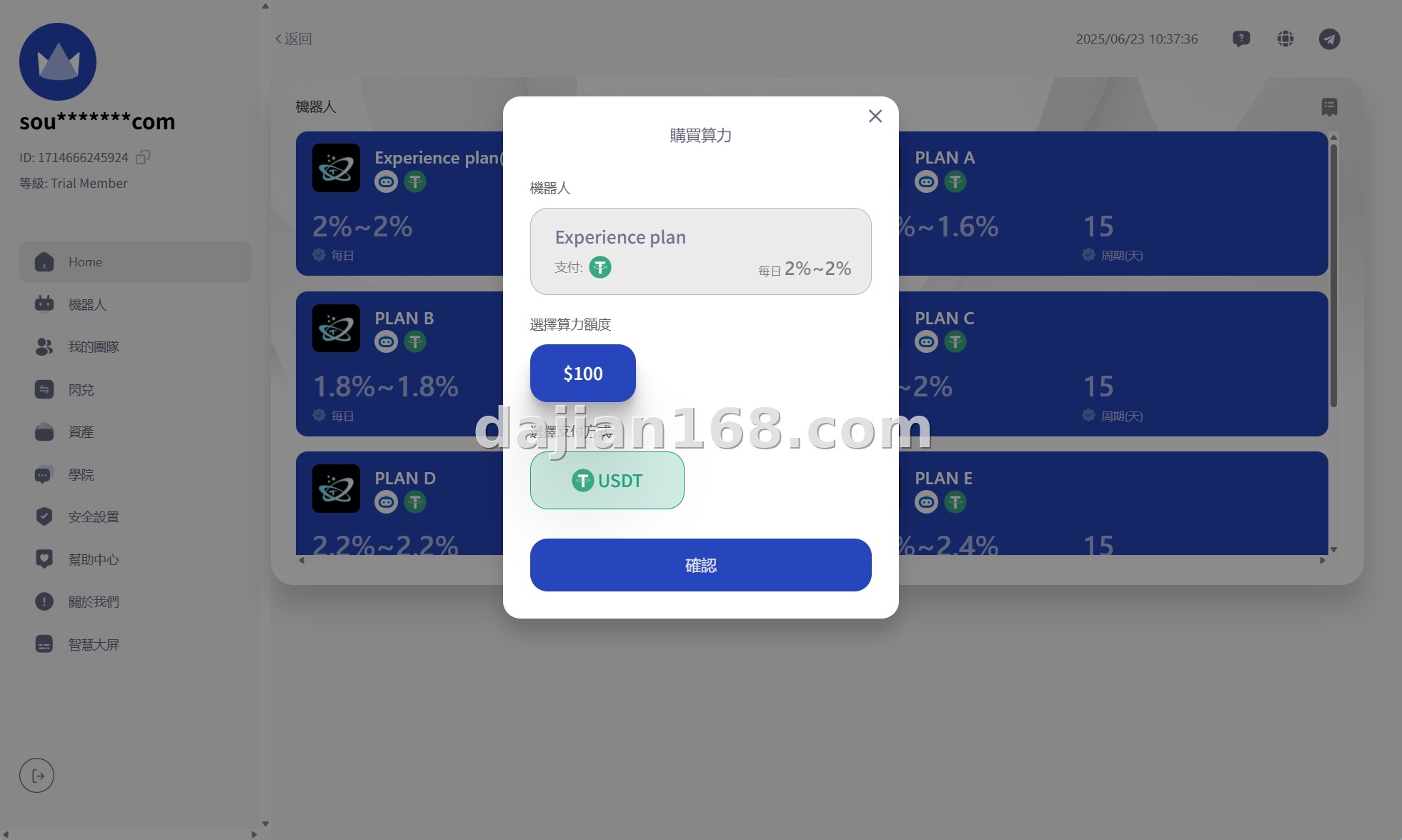
The overseas AI robot computing power investment system uses a multi-terminal separation architecture with the following core features:
- AI Robot Computing Power Investment: Users purchase computing power packages managed by AI robots. The system automatically allocates computing resources and generates daily returns based on market conditions.
- Multi-Language Support: Built-in support for English, Chinese, and Arabic with one-click language switching. The backend allows adding new language packs without code changes.
- Compound Interest Calculator: Real-time compound interest calculation showing projected returns over 30, 90, and 365 days. Users can visualize how reinvesting daily profits accelerates growth.
- Multi-Terminal Architecture: API backend (JAVA), desktop frontend (VUE), and mobile frontend (uniapp) are completely separated. Each component can be updated independently.
- AI Smart Fund Allocation: The system uses predefined algorithms to allocate user funds across different computing power pools, balancing risk and return.
The JAVA backend uses Spring Boot with MyBatis Plus, while the VUE frontend uses Element UI. The uniapp mobile frontend supports both iOS and Android packaging from a single codebase.
2. Pre-Deployment Requirements and Environment Setup
Before deploying this system, ensure your environment meets these requirements:
- JDK 11 or higher (JDK 17 LTS recommended for better GC performance)
- MySQL 8.0 or MariaDB 10.6+ with proper character set (utf8mb4)
- Redis 6.0+ for caching and session management
- Nginx 1.20+ as reverse proxy and load balancer
- Node.js 16+ for building VUE and uniapp frontends
- Maven 3.8+ for JAVA dependency management
- Minimum 4 CPU cores and 8GB RAM (JAVA applications are memory-intensive)
I strongly recommend using a cloud server with at least 8GB RAM. My first deployment used a 4GB server and the JAVA application kept crashing with OutOfMemoryError during peak loads. Upgrading to 8GB solved the issue completely.
3. Common Deployment Issues and Solutions
3.1 JAVA OutOfMemoryError during high concurrency
This is the most common issue with Spring Boot applications. The default JVM heap size is too small for production loads. Fix: Add -Xms4g -Xmx4g -XX:+UseG1GC to the startup parameters. Also enable GC logging to monitor memory usage patterns.
3.2 MySQL connection pool exhaustion
Under high load, the application may exhaust the MySQL connection pool, causing “Too many connections” errors. Fix: Increase max_connections in MySQL to 500+ and configure HikariCP with connectionTimeout=30000 and maximumPoolSize=50.
3.3 Cross-origin issues between API and frontend
Since the API and frontend are on separate domains or ports, CORS errors are common. Fix: Configure CORS in Spring Boot using @CrossOrigin annotations or a global CORS configuration bean. Do NOT use wildcard * in production — specify exact allowed origins.
3.4 Uniapp APP packaging fails with certificate errors
When packaging the uniapp project for APP stores, you need proper signing certificates. For Android, create a keystore file. For iOS, you need an Apple Developer account and provisioning profiles. Without these, the APP will not install on physical devices.
4. Customization and Extension Options
Since the full source code is provided, you can customize almost everything:
- Computing power packages: Add new investment tiers with different return rates, lock periods, and minimum investments.
- Payment gateways: Integrate crypto payments (USDT, BTC), bank transfers, or third-party processors like Stripe.
- AI algorithms: Replace the default allocation algorithm with your own machine learning model for smarter fund distribution.
- Admin dashboard: Customize the VUE admin panel to show real-time investment flows, user growth charts, and risk indicators.
Pro Tip: Before going live, run a load test using JMeter or k6 with at least 1000 concurrent users. I discovered a critical race condition in the compound interest calculation module that only appeared under load. Fixing it post-launch would have required database migration.
5. FAQ
Q1: Is the source code encrypted or obfuscated?
A: No. The full JAVA backend, VUE desktop frontend, and uniapp mobile frontend source code is provided without encryption. You can modify every file including the investment algorithms and compound interest logic.
Q2: What is the minimum investment amount for users?
A: This is fully configurable in the backend. I typically set the minimum at $50 for testing and $100 for production. The system supports fractional computing power purchases.
Q3: How does the compound interest calculation work?
A: Daily profits are automatically reinvested into the user’s computing power balance. The formula used is A = P(1 + r/n)^(nt), where profits are compounded daily. Users can withdraw principal and profits at any time after the lock period.
Q4: Can I deploy this on Windows Server?
A: Technically yes, but not recommended for production. Linux provides better stability and performance for JAVA applications. If you must use Windows, ensure proper JVM tuning and avoid running other heavy applications on the same server.
#AIRobotInvestment #ComputingPowerSystem #MultiLanguageInvestment #JAVADevelopment #CompoundInterestPlatform
-
 Alipay QR Code Scan
-
 WeChat Scan Pay





![? ? [Order-Boom Must-Have] Multilingual E-commerce Order System 3.0 Is Live!](https://xz.dajian168.com/wp-content/uploads/2025/08/telegram-img-2025-08-14-689ddcc480995.jpg)