World Cup Football Prediction UI Source Code – Vue 3 & Express Stack (Other Source Code)
World Cup Football Prediction UI Source Code – Vue 3 & Express Stack (Other Source Code)
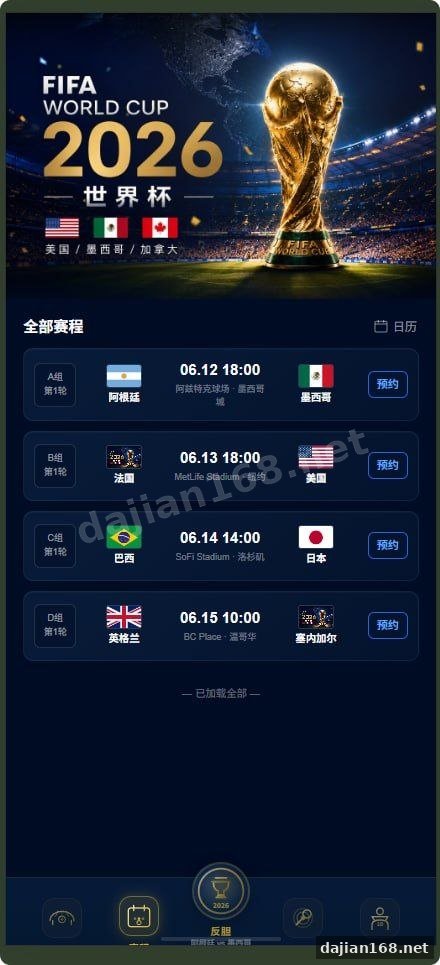
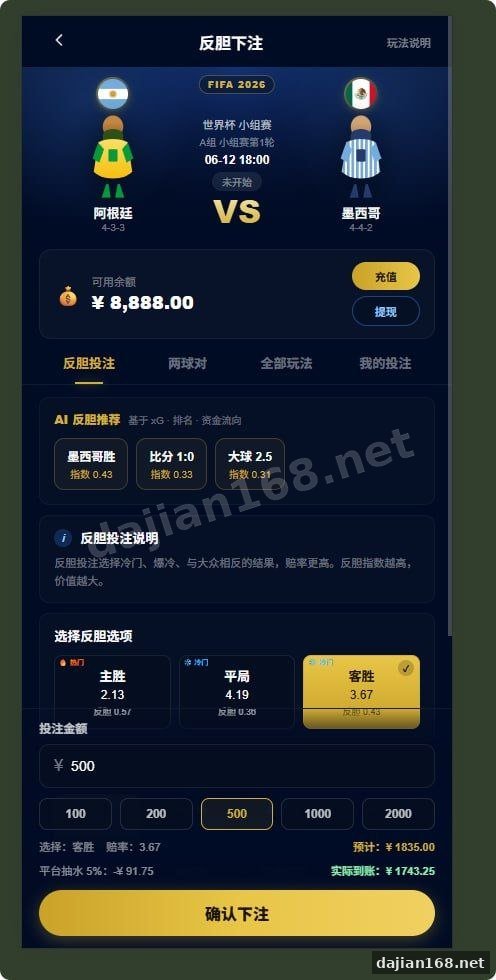
This source code download listing on dajian168 offers a 2026 World Cup themed football prediction interface, with an open Vue 3 frontend and a separate Express + Prisma backend. It sits in the 其它源码 category and is shared strictly for educational research into full-stack architecture — not for operating any prediction, betting, or wagering service. The project is split across two folders: a Vite-powered UI on the root and a Node API inside news-crawler, which makes it a useful study case for developers learning to glue multiple npm packages together.
When I pulled the archive, the first thing I noticed was the absence of any node_modules directory — both the frontend and backend ship clean, meaning you will run npm install twice. There is a small helper script that handles this in one shot, which is worth knowing about before you start.
1. Architecture & Tech Stack at a Glance
The frontend stack relies on 3 core dependencies — Vue 3, Vite, and concurrently for orchestrating both servers during development. The backend module leans on 4 main packages: Express for routing, Prisma as the ORM, axios for outbound HTTP, and a default SQLite-style provider that db:push provisions automatically. By default the frontend binds to http://localhost:5173 and the backend to http://localhost:3000, so proxy rules in vite.config are critical.
One thing I found while reading the project: the two package.json files share no workspace link — they are treated as independent sub-projects. This is actually a cleaner pattern for beginners because it avoids hoisting confusion, but it also means you must remember which folder you are currently in when running scripts.
Actionable takeaway: open package.json in both folders before running anything and memorize the script names. The install:all and dev:all commands only work from the root — not from inside news-crawler.
2. 5-Step Local Deployment Walkthrough
Here is the shortest path from a fresh clone to a working demo on your machine. I tested this on Node 18.17 and it ran without warnings:
- Step 1 — Install root dependencies:
npm installpulls Vue, Vite, and concurrently. - Step 2 — Install backend dependencies:
cd news-crawler && npm installpulls Express, Prisma, and axios. Prisma’sgeneratehook runs automatically post-install. - Step 3 — Configure environment: copy
.env.exampleto.env. For local dev, defaults usually work. - Step 4 — Provision the schema: from
news-crawler, runnpm run db:pushto create the tables. - Step 5 — Launch both servers: from the root,
npm run dev:all. Openhttp://localhost:5173and log in withdemo / 123456.
If you only want the UI without the API, run npm run dev alone — but expect most network calls to fail with 404.
Actionable takeaway: before starting, verify that Node ≥ 18 is active. Older LTS releases break the Prisma post-install step silently, and the error only surfaces when db:push runs.
3. Pitfalls, Failure Modes & Things to Verify
In testing, two failure patterns ate most of my time. The first was a flood of 404 responses on every API call — almost always a sign that the backend never started because a previous npm run dev:all still held port 3000. The second was a Prisma client error after pulling new commits; simply re-running npm run db:push resolved it without losing data.
A subtle gotcha: the README mentions removing node_modules to rebuild, but you must stop the dev server first. Deleting while concurrently holds open file handles on Windows produces phantom lock errors. There is also a setting in the admin panel that toggles a mock-mode flag — when enabled, it bypasses the real crawler and serves fixture data, which is the safest path for offline learning.
Actionable takeaway: build a pre-flight checklist before launching — (1) Node version ≥ 18, (2) ports 3000 and 5173 free, (3) .env present in news-crawler, (4) mock-mode enabled if you only want UI study, (5) admin password changed from the default 123456.
Suitable Project Types & Intended Use
This codebase is a reasonable reference for students studying Vue 3 + Express integration, Prisma schema design, and dual-process development workflows with concurrently. It is for educational research only — not for any real-money prediction, betting, lottery, or financial product. If you adapt the UI components for a non-wagering project (fantasy league dashboards, sports analytics demos, news aggregators), most of the Vue components transfer directly.
Deployment Environment Summary
Minimum requirements: Node.js 18.x or 20.x, npm 9+, 2 GB free RAM for the dev servers, and a local SQLite file generated by Prisma. For production, the build output sits in dist/ after npm run build, while the backend runs via npm start inside news-crawler. No external paid services are required for the bundled demo.
Original Reference
Original title: 新UI世界杯足球比赛竞猜源码,世界杯体育系统源码,2026世界杯源码_彩票源码_源码分享站
Original excerpt:
VIP专属内容
本站VIP
免费查看
开通会员
开通
本站VIP
可查看该内容
隐藏附件:****登录免费下载
源码介绍
新UI世界杯足球比赛竞猜源码,世界杯体育系统源码,2026世界杯源码
只有前端开源的,后端也有,具体搭建你们自行测试吧
这个项目分前端和后端两块 前端在根目录 后端在 news-crawler 文件夹里 先说怎么装依赖 需要本机装好 node 建议 18 以上 和 npm 项目里不带 node_modules 拉代码下来要自己装
第一步在项目根目录执行 npm install 会装前端的 vue vite concurrently 等
第二步进 news-crawler 执行 npm install 会装后端的 express prisma axios 等 装完会自动跑 prisma generate 懒得进两次目录的话 根目录直接 npm run install:all 一条命令把前后端依赖都装了
装好后再配环境 把 news-crawler 里面的 .env.example 复制成 .env 本地一般不用改 然后在 news-crawler 目录 npm run db:push 把数据库表建好 回到根目录 npm run dev:all
同时起前后端 前端 http://localhost:5173 后端 http://localhost:3000 浏览器打
Original screenshots:


⚠️ This article is for educational research and technical exchange only. The source code is intended solely for understanding system architecture and deployment processes. Do not use it for illegal purposes. Any commercial operation is unrelated to the author.