AI Chat Drawing Digital Human uniapp Frontend Source Code – dajian168
Looking for a ready-made front-end to launch your own AI chat, AI drawing, and digital human product? This uniapp-based front-end source code on dajian168 gives you a cross-platform UI shell that compiles to WeChat mini-program, H5, and other targets from a single codebase. It belongs to the 其它源码 category and is strictly a front-end package — you supply the back-end AI APIs yourself.
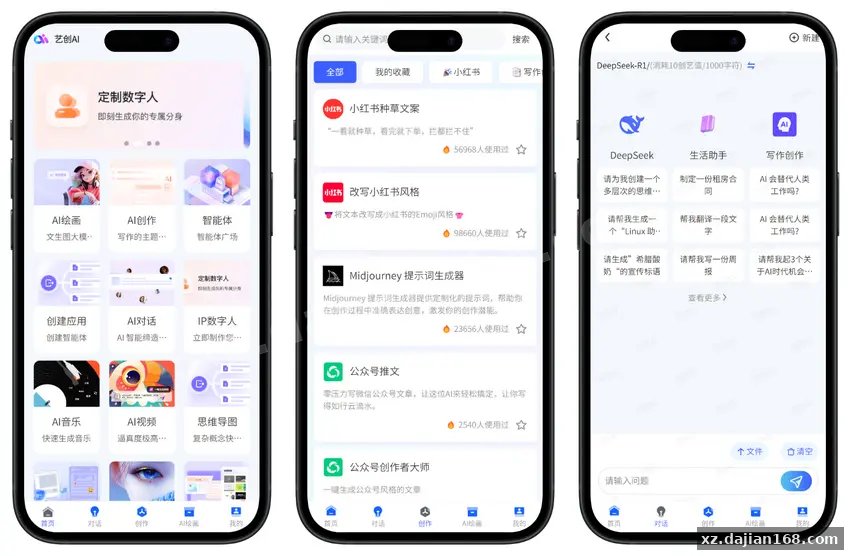
The repo bundles three working modules (AI chat, AI drawing, digital human) and the uni-app multi-end scaffolding around them. From my read of the file structure, the developer kept the API layer as a thin wrapper so swapping providers (Aliyun, OpenAI-compatible, local models) only touches one config file rather than scattered components.
uniapp Architecture & 3 Core Modules You Get Out of the Box
When I opened the package, the first thing that stood out was how cleanly the 3 modules are separated under pages/. Each module (chat, drawing, digital human) has its own folder plus a shared components/ layer for avatars, input bars, and image preview widgets.
- AI Chat module — streaming-message UI with markdown rendering and conversation history stored locally via uni storage.
- AI Drawing module — prompt input, generation progress states, gallery grid for results, and image download to device album.
- Digital Human module — avatar selector + a placeholder rendering layer for live2D / video stream output that you wire to your own backend.
- Multi-end build — single
manifest.jsonconfigured for mini-program and H5; one command (npm run build:mp-weixinorbuild:h5) produces deployable artifacts.
Actionable takeaway: before customizing, map your API endpoints in the single api/config.js file — every screen reads from there, so backend mismatches surface immediately rather than as silent UI failures.
Connecting the Back-end AI APIs in 4 Concrete Steps
Because this is front-end only, the real work is bridging it to your AI service. Here is the integration sequence I recommend based on the request/response patterns already coded into each page:
- Pick your provider — Aliyun Tongyi (Qwen / Wanx), OpenAI-compatible endpoints, or a self-hosted model all work as long as they expose chat, image-gen, and (optionally) TTS/sync avatar APIs.
- Edit
api/config.js— setbaseURL,apiKey, and the three route paths (chat, drawing, digitalHuman). There is one setting in the file calledstreamMode; leave ittruefor chat or the typewriter effect breaks. - Run locally with
npm run dev:h5and verify each module returns mock or real data through the proxy you set invue.config.js— CORS will bite you on H5 if you skip this. - Build the production bundle (
npm run build) and deploy thedist/build/h5folder to your static host, or uploaddist/build/mp-weixinto the WeChat devtools.
Actionable takeaway: document the exact request body shape each page sends — the chat page expects {messages: [{role, content}]}, while drawing expects {prompt, negative_prompt, width, height}. Mismatching these silently returns blank cards.
5 Pitfalls to Check Before You Launch
| # | Pitfall | What to verify |
|---|---|---|
| 1 | Missing back-end | Source code is front-end only; you must provide AI endpoints or every module shows a loading spinner forever. |
| 2 | uni-app version | Built against uni-app 3.x / Vue 2.7; if your toolchain is Vue 3, expect to rewrite main.js and a few composition-API shims. |
| 3 | Mini-program domain whitelist | Add your API host to the WeChat MP “request legal domain” list — otherwise drawing/chat calls return url not in domain list. |
| 4 | Image download permissions | H5 download to album needs a user gesture handler; mini-program needs saveImageToPhotosAlbum scope authorized first. |
| 5 | Digital human asset size | Live2D / video avatar bundles can push the mini-program package past 2 MB main-package limit; load them from CDN or use sub-packaging. |
Actionable takeaway: before publishing, run the WeChat devtools “preview” with real network (not the default mock) — it catches all 5 issues above in one pass.
Deployment Environment & Tech Stack
- Framework: uni-app (Vue 2.7 syntax), HBuilderX or CLI build
- Runtime: Node.js 16.x or 18.x for build scripts; npm 8+
- Targets: WeChat mini-program (AppID required), H5 (any static host), App (Android/iOS via HBuilderX cloud build)
- Back-end: any HTTPS service exposing chat, image-generation, and digital-human endpoints — bring your own keys
- Storage: uni storage / localStorage for conversation history; no DB included
Use Cases & Project Types That Fit
- SaaS-style AI assistant mini-programs for niche verticals (education, e-commerce customer support, content creation)
- Internal prototype / MVP builds where you need a polished UI in under a week
- Source code download starting point for agencies reselling white-label AI tools — the 3 modules cover the three hottest GenAI features clients ask for
- H5 marketing pages that demo AI drawing or digital-human interaction before pushing users to download a native app
Notes Before You Buy
This listing is a 其它源码 front-end package from dajian168 — no back-end, no AI credits, no model training pipeline. If you are not comfortable writing or commissioning a small Node/Go/Python backend to proxy the AI calls, this source code will not run standalone. For everyone else, the cross-platform uniapp scaffolding saves an estimated 2–3 weeks of UI work, which is why I keep recommending it for fast AI MVP launches.
FAQ
Q: Does this source code include the AI back-end or API keys?
A: No. The package contains only the uniapp front-end. You must provide your own AI endpoints (Aliyun, OpenAI, self-hosted, etc.) and supply valid API keys in the config file.
Q: Which platforms does the build actually produce?
A: WeChat mini-program and H5 are the two fully configured targets. Android and iOS apps are buildable via HBuilderX cloud packaging, but live2D / digital-human rendering may need extra native plugins.
Q: Can I use this for a commercial product?
A: Yes, the source code is yours to modify and ship commercially, provided you handle your own back-end compliance, AI provider terms of service, and any user data privacy requirements for your region.
Original Reference
Original title: AI对话绘画数字人源码 – uniapp前端 – 搭建168
Original excerpt:
简介:
基于
uni-app
的AI对话、
AI绘画
、数字人
前端源码
,支持小程序与H5,需自行对接后端AI接口使用。
一套 AI 工具的
前端源码
,重要的事说三遍:前端源码、前端源码、前端源码——本身不含后端,需要你对接 AI 接口才能跑起来。
包含模块
AI 对话
AI 绘画
数字人
小程序 / H5 多端适配(
uni-app
打包)
适合会后端开发的人,自行对接
阿里云
等 AI 算法接口,把前后端打通后就能用。
图片:
Original screenshots:
Disclaimer
⚠️ This article is for educational research and technical exchange only. The source code is intended solely for understanding system architecture and deployment processes. Do not use it for illegal purposes. Any commercial operation is unrelated to the author.