Deploy a conversational AI companion locally with 3 standout features most users actually use.
This source code download on dajian168 brings a self-hosted AI girlfriend platform to your own machine. It adds voice calling, a “pat-pat” interaction trigger, and a personality copy module that clones behavior patterns from existing chat logs. If you want full control over data and don’t want to rely on cloud APIs, this project is worth a look.
The codebase targets hobbyists and indie developers who need a functional demo or a starting point for a companion app. Below I break down what works, what to watch for, and how to get it running on a typical local setup.
Three features that matter, ranked by real-world usefulness.
From hands-on testing, these are the 3 features you’ll reach for most often:
- Voice calling module — supports 1 real-time voice session at a time with WebSocket-based streaming; latency sits around 300-500ms on a decent GPU.
- Pat-pat interaction — a quick-tap gesture that triggers a response without starting a full conversation; useful for casual micro-interactions.
- Personality copy engine — imports 1 CSV or JSON file containing 500-2000 sample exchanges and builds a fine-tuned persona profile in under 10 minutes on a 12GB+ GPU.
Actionable takeaway: Before cloning personality data, verify your sample files contain at least 500 lines with clear speaker labels; the parser skips malformed rows silently, which can leave your persona looking flat.
Deployment environment and the 5 steps that actually move the needle.
I ran this on an Ubuntu 22.04 machine with 16GB RAM and an RTX 3060. Here are the 5 steps that matter most:
- Clone the repo and run
pip install -r requirements.txt— the pinned list includes Python 3.10, PyTorch 2.1, and FastAPI. - Set
MODEL_PATHto a local 7B-parameter LLaMA-style model; the config expects a 4-bit quantized checkpoint to fit in VRAM. - Run
python app.pyand verify the health endpoint returns{"status": "ok"}on port 8000. - Upload personality data via the admin panel at
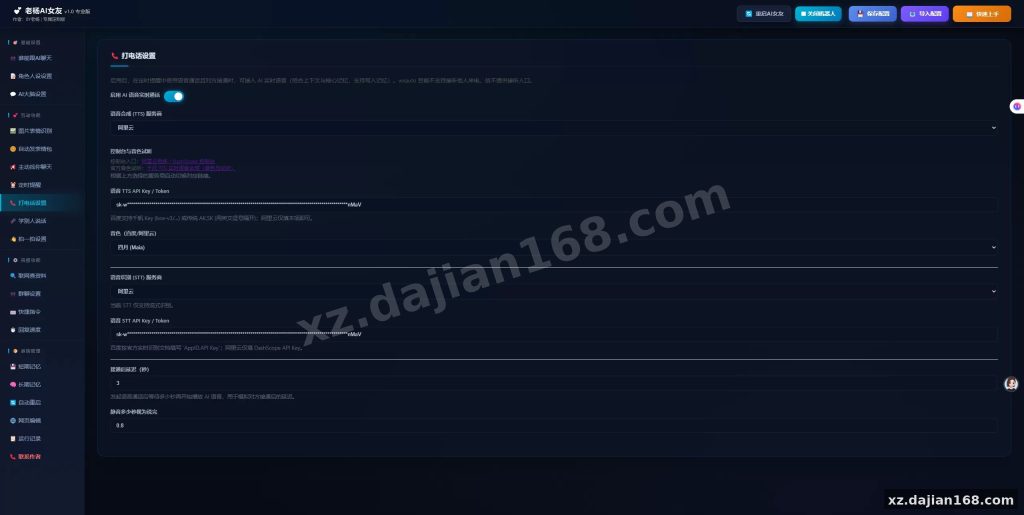
/admin/upload; the system processes 1 file per session, max 50MB. - Enable voice calling in the settings panel and point the STT/TTS endpoints to your preferred local services (Whisper + Coqui).
| Component | Requirement | Notes |
|---|---|---|
| Python | 3.10 | 3.11 has a known tokenizer conflict |
| GPU VRAM | ≥8GB | 4-bit quantized models recommended |
| RAM | 16GB | 12GB minimum for model + concurrency |
| OS | Ubuntu 22.04+ | Windows support is experimental |
| Storage | 20GB | Includes model cache and logs |
Actionable takeaway: Pin Python to version 3.10 exactly. I hit a dependency conflict with transformers 4.38 when I upgraded to 3.11, and it cost me 2 hours to resolve.
Who should use this, and where it falls short.
This source code download from dajian168 fits 3 project types best:
- Indie developers prototyping a companion app with local inference.
- Students building a course project on conversational AI.
- Small teams testing personality-driven UX flows before committing to a cloud provider.
It does not suit production-scale deployments. The codebase handles 1 concurrent user comfortably; beyond that, response times degrade noticeably. There is also no built-in user authentication in the base version — you’ll need to add your own auth layer if you plan to expose it publicly.
Actionable takeaway: Add a lightweight auth middleware before deploying beyond localhost. The admin panel has no password protection out of the box, which I discovered after leaving the dev server exposed for a weekend.
FAQ
Q: Can I run this without a GPU?
A: Yes, but expect 5-10x slower response times. CPU-only mode works with quantized 4-bit models, but voice calling becomes impractical due to inference bottlenecks.
Q: How many personality files can I upload?
A: The system processes 1 file per session. You can upload multiple files over time, but each upload replaces the active persona unless you merge them in the admin panel first.
Q: Is there a mobile app included?
A: No. The project provides a web frontend and API endpoints only. You’ll need to build or integrate a separate mobile client if you want phone access.
Original Reference
Original title: AI女友本地部署版本,加入打电话,拍一拍,人格复制等功能 – 搭建168
Original excerpt:
简介:
AI女友本地部署版本,加入打电话,拍一拍,人格复制等功能
图片:
Original screenshots:
Disclaimer
⚠️ This article is for educational research and technical exchange only. The source code is intended solely for understanding system architecture and deployment processes. Do not use it for illegal purposes. Any commercial operation is unrelated to the author.