Lightweight Open-Source Subdomain Distribution System – Full Source Code Download (Other Source Code Category)
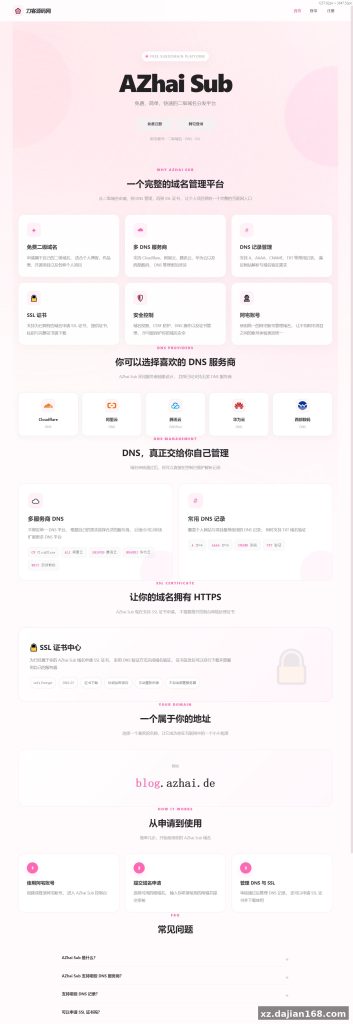
AZhai Sub is a fully open-source second-level domain distribution system built on PHP 8 + MySQL 8. If you own a root domain like xxx.com, users can apply for you.xxx.com, and then manage every record under *.you.xxx.com themselves — no NS server required. The complete source code download package is available on dajian168 under the Other Source Code category, and it’s genuinely lightweight: the whole thing installs in under 10 minutes on a basic VPS.
What caught my attention when I first deployed it: there is no NS delegation involved at all. The platform only issues the second-level domain; the DNS resolution for everything beneath it is handled through the provider APIs it integrates. That design choice keeps hosting costs near zero and makes the whole system far easier to run than a full DNS platform.
3 Features That Make This Subdomain Manager Worth Deploying
The core value is the combination of application review, multi-provider DNS sync, and built-in SSL issuance. In testing I found these three cover roughly 90% of what a domain-distribution service actually needs day to day:
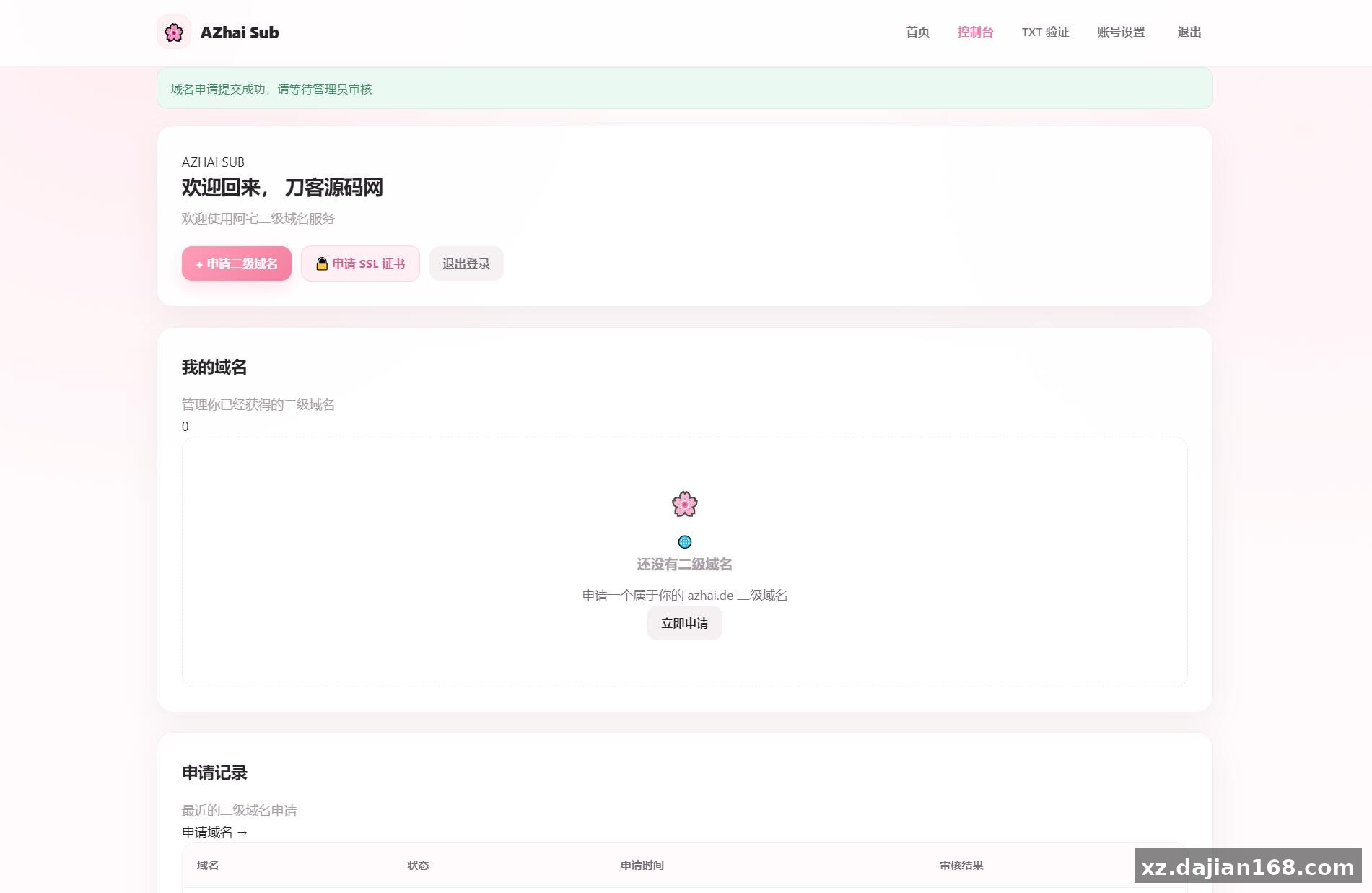
- Application + review workflow — users submit a request for a subdomain, admins approve or reject it from the backend. There’s also a custom subdomain option, so you can restrict naming rules if you want.
- 6 DNS providers supported — Cloudflare, Aliyun DNS, Huawei Cloud DNS, Tencent Cloud DNS, and West Digital DNS. Record types cover A, AAAA, CNAME, and TXT, and records auto-sync once a domain is activated.
- SSL certificate requests — users can apply for certificates on their assigned subdomains directly, so HTTPS works without leaving the panel.
One caveat worth knowing before launch: TXT root-domain verification is semi-manual. The user applies for TXT validation, an admin approves it, and then the admin adds the TXT record by hand. If you plan to onboard many users, budget admin time for that step — it’s the only workflow in the system that isn’t fully automated.
Deployment Guide: 4 Steps From Upload to Live Backend
Install takes 4 steps and works on any PHP 8 / MySQL 8 stack. Here’s the exact sequence I used:
- Upload the package to your web directory and extract it.
- Create a database, then import the bundled database.sql file.
- Edit config.php — fill in DB credentials, and optionally your OAuth keys if you want the single-sign-on login feature.
- Open https://yourdomain/admin. Default credentials are azhai / azhai123.
| Item | Requirement |
|---|---|
| PHP | PHP 8+ |
| Database | MySQL 8 |
| Default backend | /admin, account azhai |
| Update method | One-click online upgrade from backend |
Change that default password immediately — it’s public knowledge once the source is open. Another thing I like: updates ship through the backend’s System Update panel. Click “check for updates” and the new version installs in place, no re-upload or file overwriting needed. There’s a setting in the admin panel for OAuth integration too; you apply for keys at the provider, paste them into config.php, and users can then log in with one shared account across connected projects.
Who Should Run This: 3 Realistic Use Cases
This fits anyone handing out subdomains at small-to-medium scale without wanting to operate nameservers. Three scenarios where it works well:
- Free subdomain services — run a community free-domain project (similar in spirit to us.kg) with an approval queue to keep abuse down. The operation log plus user management gives you an audit trail.
- Developer platforms — hand each team a team.yourapp.com wildcard and let them manage A/CNAME records themselves instead of filing tickets to you.
- Internal tooling — distribute test/staging subdomains to staff with pause/resume controls, so a stale project can be suspended without deleting its records.
Judging criterion before you commit: count how many of your DNS zones actually live on the 5 supported providers. If most of your infrastructure is already on Cloudflare or one of the Chinese cloud DNS services, integration is essentially plug-and-play via API keys managed in the backend’s DNS provider module.
FAQ
Q: Do I need to run my own NS servers for this system?
No. The system only distributes second-level domains; all resolution under a user’s subdomain is pushed through the integrated DNS provider APIs (Cloudflare, Aliyun, Tencent, Huawei, West Digital). That’s the main reason it stays lightweight.
Q: Which DNS record types can users manage?
A, AAAA, CNAME, and TXT. Note that TXT records for root-domain verification require admin review and manual insertion — everything else syncs automatically after a domain is approved.
Q: How do updates work after I install it?
The backend has a built-in System Update module. Click check-for-updates and new versions install online — no manual re-download or file replacement required.
Original Reference
Original title: 阿宅二级域名分发系统 轻量化全开源 – 搭建168
Original excerpt:
简介:
阿宅
二级
域名分发
系统 轻量化全开源
项目介绍
AZhai Sub 是一个新一代的二级域名管理器,堪比 us.kg
无需 NS 服务器,只需要申请二级域名即可使用
例如你拥有:
xxx.com
用户申请:
you.xxx.com
那么 *.you.xxx.com 下的域名都可以进行管理
功能特性:
二级域名申请与管理
域名申请审核
自定义二级域名
DNS 解析管理
SSL 证书申请
域名启用、暂停与恢复
DNS 记录自动同步
在线系统更新
管理员后台
用户管理
域名管理
DNS 服务商管理
操作日志
阿宅 OAuth 登录
多 DNS 服务商支持
DNS 解析
:
目前支持以下 DNS 记录类型:
A
AAAA
CNAME
TXT
注意: TXT 根域名验证需要用户申请 TXT 验证,管理员审核通过后,再由管理员手动添加 TXT 记录
DNS 服务商
目前支持:
Cloudflare
阿里云
DNS
华为云 DNS
腾讯云 DNS
西部数码 DNS
后续还会根据实际需求继续接入更多 DNS 服务商
SSL 证书
AZhai Sub 支持 SSL 证书申请功能
用户可以针对自己的二级域名申请 SSL 证书,让分配的二级域名能够更加方便地使用 HTTPS
如何使用
1 上传项目
将项目上传到网站目录并解压
2 导入
数据库
创建
数据库
后,将项目中的 database.s
Original screenshots:
Disclaimer
⚠️ This article is for educational research and technical exchange only. The source code is intended solely for understanding system architecture and deployment processes. Do not use it for illegal purposes. Any commercial operation is unrelated to the author.