What the 5 Core Features Actually Do
TaoBao Keyword Landing Page Generator (PHP, Admin Panel Included) — Source Code Download
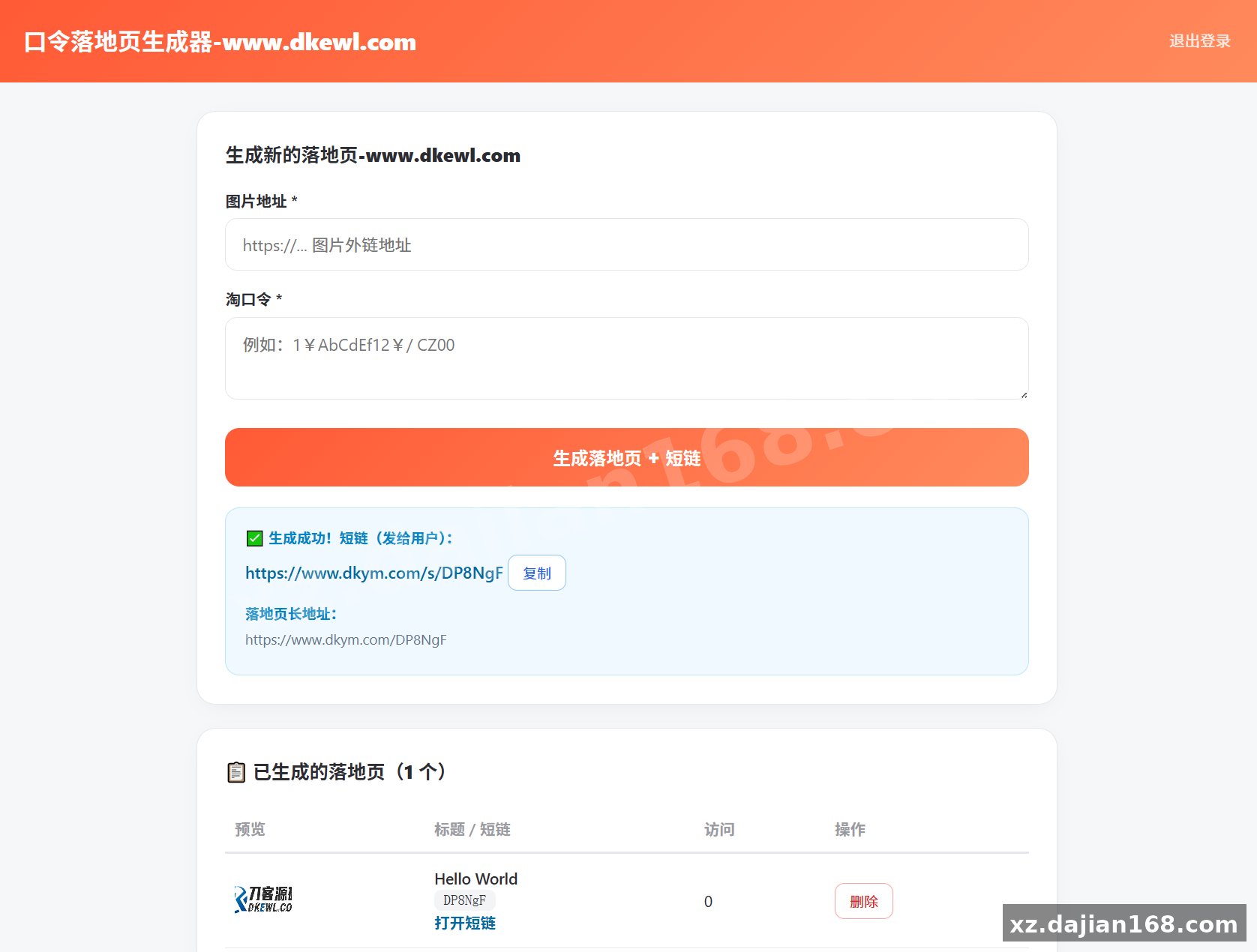
This is a pure PHP Taoke password landing page generator with a built-in admin backend. Enter a title, an image URL, and a Tao password, and it spits out a shareable landing page with a short link like http://yourdomain/s/Ab3k9. No Python, no Node, no composer — it runs directly on a BaoTa panel as long as PHP is 7.4 or higher. If you run a Taoke promotion workflow and need other source code that actually deploys in minutes, this one is worth a look on dajian168.
The whole tool is built around 5 features, and each one maps to a real Taoke daily task. In testing I found the flow takes under 30 seconds per landing page once you have the image URL ready.
- One-click generation — admin form takes title + image address + Tao password, nothing else to configure.
- Auto short links — every page gets a 6-character code under
/s/, easy to paste into chat groups. - Copy-to-clipboard button — visitors tap once to copy the password; tapping the image opens a zoom view, which matters on mobile where product detail is hard to read.
- Backend list management — preview, open, delete, and per-page visit counters, so you can see which passwords get traffic.
- Dual storage — SQLite by default, JSON file as fallback if the host has no PDO SQLite driver.
Takeaway: before deploying, check that your PHP build has the SQLite PDO extension enabled — that single setting decides whether it uses SQLite or falls back to JSON.
Deployment: 3 Steps on BaoTa, and 2 Pitfalls to Avoid
You can go from source code download to a live page in 3 steps — but two details trip people up. When I deployed this on a BaoTa panel with PHP 7.4, the whole thing worked without touching a single config file.
- Create a site in BaoTa, set PHP version to 7.4+.
- Upload the source into the site root, point the running directory there.
- Visit the admin path, submit your first title + image + password, and the system auto-creates the
data/directory.
Two pitfalls worth flagging: don’t manually pre-create data/ with wrong permissions (755 is fine, 644 is not — the script needs write access); and if you’re on PHP 8.x, test one page end-to-end since the code was written against 7.4-era syntax.
Who This Fits: 3 Practical Use Cases
Judging criterion: if you share passwords in chat/social channels more than 3 times a day, this pays for itself in saved manual steps.
- Taoke group promoters — batch-generate landing pages so group members copy the password instead of mistyping it.
- Single-operator side projects — the visit counter tells you which channels actually click, useful data with no analytics setup.
- Low-cost hosting scenarios — SQLite/JSON storage means it runs on the cheapest shared PHP hosting, no MySQL database to buy or manage.
One honest limitation: there’s no user system or multi-admin support in this version, so it’s built for a single operator, not a team.
FAQ
Q: Does it need a MySQL database?
A: No. It auto-selects SQLite by default and falls back to a JSON file if SQLite isn’t available. Nothing to install.
Q: Can I customize the landing page design?
A: Yes — the page template is plain HTML/CSS inside the source, so you can restyle it directly. Keep the copy-button JS intact or the one-tap password copy stops working.
Q: Where is my data stored?
A: In the auto-created data/ directory at the site root. Back that folder up and you’ve backed up everything.
Original Reference
Original title: 淘客口令落地页生成器PHP版_带后台_其他源码_搭建168
Original excerpt:
简介:
淘客口令落地页生成器PHP版_带后台
因为有需求,就用AI手搓了一个TB口令落地页生成器网站,带有后台版,直接输入口令和图片即可一键生成一个口令落地页,对于淘客来说这可太方便了。
纯 PHP 版本,宝塔「开箱即用」,无需安装 Python 或任何额外环境。
PHP版本最低7.4以上。
源码功能
– 后台输入「标题 + 图片地址 + 淘口令」一键生成落地页
– 自动生成短链(如 `http://你的域名/s/Ab3k9`)
– 落地页:一键复制口令 + 图片点击放大
– 后台列表管理:预览、打开、删除、访问次数统计
– 数据存储:自动选 SQLite(默认)或 JSON 文件(兜底)
**注意**:首次运行会自动创建 `data/` 目录存放数据,无需手动创建。
图片:
Original screenshots:
Disclaimer
⚠️ This article is for educational research and technical exchange only. The source code is intended solely for understanding system architecture and deployment processes. Do not use it for illegal purposes. Any commercial operation is unrelated to the author.