
Contact Information: To prevent loss, please remember this website: dajian168.com Telegram: @dajian168 Telegram Channel: @dajian168168 WhatsApp: +852 Line ID: dajian168 Skype: [email protected] Email: [email protected] [email protected] USDT-TRC20 Address: USDT-TRC20 Address 2: Avatar/Profile:...
- About Us
- 2024-06-29
- 2655
Small loan with signature, P2P, Chinese only...
- Latest Updates
- 2025-05-19
- 1141
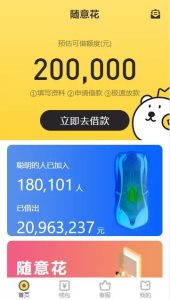
Small loan with signature P2P only Chinese #loan #p2p #microloan...
- Latest Updates
- 2025-05-19
- 1136
Build 168 – Various website building/cash platform/credit platform/micro platform/demo trading/time platform/investment financial platform/exchange/chat IM instant messaging/chess and card room cards/gaming robot/servers/domains: Photo uniapp version stock fund financial investment system Investment Financial Fund: Frontend is uniapp. Backend is thinkphp 1. Real name authentication unlock 2. Public mutual funds, private funds 3. Using Alibaba Cloud thousands of data interfaces 4. Add watchlist function 5. Risk assessment 6. Open fund account 7. Add Yu’e Bao (money market fund) function 8. Add team distribution...
- Latest Updates
- 2025-05-16
- 1084
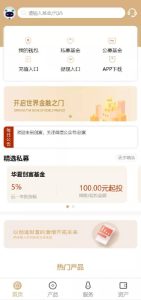
uniapp Version Stock Fund Investment System Investment & Financial Management Fund Frontend: uniapp, Backend: ThinkPHP 1. Real-name authentication unlock 2. Public funds & private funds 3. Real-time data interface from Alibaba Cloud 4. Add favorites/stock watchlist function 5. Risk assessment 6. Open fund account 7. Add Yu’ebao (money market fund) function 8. Add team distribution/referral system #InvestmentFinancialSystem #Investment #FinancialManagement #Stock...
- Latest Updates
- 2025-05-16
- 1161
Clash Meta for Android Client Tutorial Client Tutorial 1. After downloading and installing Text Tutorial: 1. Make sure Clash Meta for Android is downloaded and installed on your phone. 2. Open this site in your phone browser (Chrome, Edge, Firefox, etc. are recommended. Domestic browsers may block this site) 3. Select “Dashboard” or “My Subscription” in the website backend: 4. Click “One-Click Subscription” -> “Import to Clash Meta for Android: Click to import to Clash Meta Note: If clicking to import Clash doesn’t work, you can use the manual subscription address paste method: Click “Copy Subscription Address” in the website panel, open Clash, click “Profiles” -> “+” in the upper right corner -> “URL” -> click “URL” -> paste and confirm -> click the “Save” icon in the upper right corner. 5. Under normal circumstances, the Clash client interface will pop up. Click the upper right corner to download the configuration and set the auto-update time: 6. After successful download, it will automatically jump to the configuration selection interface. Select the current configuration: 7. Return to the main interface and click “Start”: 8. On the node selection page, switch points......
- Tech Insights, Website Building Tutorials
- 2025-05-04
- 1223
A Vue Development WebSocket/wss Communication Error CLOSED = 1006 CLOSE_ABNORMAL Solution Test file first: “` WebSocket Test Page WebSocket Test Page Connection Control Connect WSS Connect WSSS Connect WSSSS Disconnect Clear Logs Send Message Send Connection Info Not Connected Log Records let ws = null; const logContainer = document.getElementById('logContainer'); const connectionStatus = document.getElementById('connectionStatus'); const disconnectBtn = document.getElementById('disconnectBtn'); function getTimestamp() { return new Date().toLocaleTimeString(); } function log(message, type = 'info') { const timestamp = getTimestamp(); const logEntry = document.createElement('div'); logEntry.innerHTML = `[${timestamp}] ${message}`; logEntry.className = type; logContainer.appendChild(logEntry); logContainer.scrollTop = logContainer.scrollHeight; } function updateConnectionStatus(message, type) { connectionStatus.textContent = message; connectionStatus.className = `status ${type}`; } function connectWS(url) { if (ws) { log('Closing existing connection...', 'info'); ws.close(); } try { log(`Attempting to connect to ${url}...`, 'info'); ws = new WebSocket(url); ws.onopen = function() { log('WebSocket connection successful!', 'success'); updateConnectionStatus('Connected', 'success'); disconnectBtn.disabled = false; }; ws.onclose = function(event) { let reason = 'Unknown reason'; switch (event.code) { case 1000: reason = 'Normal closure'; break; case 1001: reason = 'Server closing or client leaving page'; break; case 1002: reason = 'Protocol error'; break; case 1003: reason = 'Unsupported data type'; break; case 1006: reason = 'Unable to connect to server (possibly network issues or server not......
- Tech Insights
- 2025-04-08
- 1506
Disclaimer: This article is provided for technical education only. It is not investment, legal, or business advice. When applying CORS or proxy configurations, always follow security best practices and comply with local regulations and your organization’s policies. Solutions to Cross-Origin Issues in uniapp/Vue Frontend Development What Is Cross-Origin, and Why Does It Matter? Cross-origin is a browser-level security concept. It happens when JavaScript running on one origin tries to request a resource from a different origin. For example, if a page hosted on site A makes an AJAX call to site B, the browser treats that as a cross-origin request. Two URLs share the same origin only when they match in all three of these: Protocol: http and https are considered different origins. Domain name: including subdomains such as api.example.com and www.example.com. Port number: localhost:8080 and localhost:3000 are different origins. Native apps, mini-programs, and other non-H5 platforms generally do not hit cross-origin restrictions because they are not running inside a browser sandbox. The main exception is iOS WKWebView, which is used in 5+App, uni-app’s web-view component, and renderjs. In those cases, WKWebView’s same-origin rules can still block requests. DCloud has a dedicated explanation on this edge case: https://ask.dcloud.net.cn/article/36348. Inside a......
- Tech Insights
- 2025-04-08
- 1418
Huobi Digital Currency API latency is very high, causing K-line lag issues. Solutions: 1. Upgrade to high-config server 2. Switch to Binance API 3. Use Huobi API proxy/mirror # K-line Data API (API endpoint masked)/api/v3/klines?symbol=BTCUSDT&interval=1d&limit=200 # Advantages: – Fast response speed – Completely free – Stable and reliable – Similar data format # K-line Data API https://www.okx.com/api/v5/market/candles?instId=BTC-USDT&bar=1D # Advantages: – Fast access from China – Free to use – Real-time data # Market Data API https://api.coingecko.com/api/v3/coins/bitcoin/market_chart?vs_currency=usdt&days=200&interval=daily # Advantages: – No registration required – Large free quota – Comprehensive data # Historical K-line Data (API endpoint masked)/data/v2/histoday?fsym=BTC&tsym=USDT&limit=200 # Advantages: – Fast response – Basic features are free – Accurate data *************** public function getkdata() { $pid = $this->app->request->param(‘pid’); if(!$pid) $this->error(‘Product ID cannot be empty’); $num = $this->app->request->param(‘num’, 30); if(!$num) $this->error(‘Time cannot be empty’); $pro = Db::name(‘LcProduct’)->where([‘id’=>$pid])->find(); if(!$pro) $this->error(‘Product information abnormal’); $interval = input(‘interval’,’1′); $klength = ($interval == ‘d’) ? 24*60*60*$num : $interval*60*$num; $k_map[‘pid’] = $pid; $k_map[‘ktime’] = array(‘points simulationween’, array(time() – $klength, time())); $pro[‘procode’] = $pro[‘code’]; if(strpos($pro[‘procode’], ‘btc’)!==false || strpos($pro[‘procode’], ‘usdt’)!==false) { // Convert to Binance time interval format switch ($interval) { case ‘1’: $binance_interval = ‘1m’; break; case ‘5’: $binance_interval = ‘5m’; break; case ’15’: $binance_interval = ’15m’; break; case......
- Development Case Studies, Tech Insights, Website Building Tutorials
- 2025-04-06
- 2175
About a vue project that kept reporting the error ‘vue-cli-service’ is not an internal or external command, nor a runnable program. Delete node_modules in the vue project folder and then reinstall from scratch....
- Development Case Studies, Tech Insights, Website Building Tutorials
- 2025-04-05
- 66232