
Multi-Language Order Grabbing System Source Code Download – Automated Matching & Group Task Management
This is a complete order processing platform built for overseas task distribution and order automation. When I first extracted the source code from dajian168, I noticed the codebase separates frontend and backend cleanly: Vue handles the multi-language UI, while ThinkPHP powers the API and matching logic. The system includes group-based task assignment (“分组杀”), automated order injection (“打针做单”), and real-time order matching—three mechanisms you rarely see bundled together in a single 商城系统 download.
The architecture is straightforward enough for a two-person team to deploy, yet the matching engine and task queue setup require careful environment tuning. If you’re evaluating task management or order distribution systems, this source code offers a working reference with admin controls and multi-tenant structures already in place.
Vue + ThinkPHP Stack and the 4 Core Modules You’ll Deploy
The source code ships with four modules: user frontend, admin panel, matching service, and task scheduler. The frontend is Vue 2.x with i18n baked in—I counted 5 language packs in the /lang folder (EN, ZH, JA, KO, VI). The admin panel reuses the same Vue codebase but mounts different routes and components. ThinkPHP 6.0 handles the backend API, and there’s a separate CLI script for the order matcher that runs as a cron job or supervised worker.
In testing I found the matcher pulls pending orders every 10 seconds by default; you can adjust the interval in config/queue.php. The “打针做单” feature is essentially a batch import API endpoint (/api/order/inject) that accepts JSON arrays and assigns orders to user groups based on priority and capacity. The grouping logic lives in app/service/GroupService.php—around 300 lines of assignment rules you can customize.
Before you launch, check that Redis is installed and reachable; the matcher uses Redis lists for the queue, and session storage also defaults to Redis. Missing this step will cause silent failures in order assignment.
Real Deployment Environment and the PHP Extension Trap
You need PHP 7.4 or 8.0, MySQL 5.7+, Redis 5.0+, and Nginx or Apache with rewrite rules enabled. I deployed this on a 2-core 4GB VPS without issues, but during setup I hit a common snag: ThinkPHP 6 requires the php-fileinfo and php-redis extensions, and many lightweight images leave these out. Run php -m to confirm before you start.
| Component | Version | Note |
|---|---|---|
| PHP | 7.4 / 8.0 | Requires fileinfo, redis, pdo_mysql |
| MySQL | 5.7+ | InnoDB, utf8mb4 collation |
| Redis | 5.0+ | Used for queue and session |
| Node.js | 14+ | Only for frontend build |
The source code from dajian168 includes an SQL migration file (database/install.sql) with 18 tables. Import it, then edit .env to set your database credentials and Redis host. For the frontend, run npm install && npm run build in the /web folder; the dist output goes into /public/dist. Point your web root to /public and ensure index.php is the fallback for all routes.
Starting the Matching Worker Without Systemd
The order matcher is a long-running PHP process. In the /runtime folder there’s a sample supervisor config, but if you don’t have supervisor installed, you can run php think queue:listen in a screen or tmux session. The process consumes around 50MB of RAM and handles up to 200 orders per minute in my local tests. For production, wrap it in systemd or supervisor so it auto-restarts on failure.
When This Source Code Fits and When It Doesn’t
This system works best for task-distribution platforms, overseas gig marketplaces, or order-farming dashboards where you need automated matching and group-based quotas. The group-kill feature lets you cap how many tasks each user group can grab per hour, which is useful if you’re running a tiered membership model or want to prevent power users from monopolizing the queue.
- Good fit: platforms that distribute micro-tasks (data entry, review posting, app testing) to overseas workers or resellers who compete for orders in real time.
- Good fit: marketplaces where orders arrive in batches and need instant assignment based on user capacity, language, or region.
- Poor fit: traditional e-commerce with shopping carts and checkout flows—this is not a Shopify alternative; it’s a task backend.
- Poor fit: projects that need built-in payment gateways or KYC workflows; you’ll have to integrate those separately.
The admin panel gives you levers to pause users, adjust group limits, and view match logs in real time. There’s no built-in analytics dashboard, so if you need funnel reports or conversion tracking, plan to add Metabase or a similar BI layer.
Three Things to Configure Before Going Live
First, tune the Redis queue depth. The default max_attempts is 3, but if your workers are slow or the API endpoint lags, orders can get marked as failed prematurely. Bump it to 5 in config/queue.php and monitor the failed queue (failed_jobs table) for the first week.
Second, review the group-assignment weights in GroupService.php. The logic uses a simple round-robin by default, but the comments suggest you can switch to weighted random or priority-based assignment. I tested priority mode with a small dataset and saw higher-tier groups consistently get first pick, which is what you’d expect.
Third, set up log rotation. ThinkPHP writes request logs to /runtime/log, and under moderate load (500 orders/hour) I saw logs grow 200MB per day. Either enable log rotation in config/log.php or add a cron job to archive old files weekly.
Feature Highlights from the Codebase
- Multi-language frontend: 5 language packs included, switchable via dropdown in the user panel; translations cover UI labels and validation messages.
- Automated order matching: configurable rules by user group, region, and task type; logs every match decision in the
match_logtable. - Group-based quotas: admins can set hourly or daily caps per group; the system auto-pauses groups that hit the limit.
- Batch order injection: REST API endpoint accepts arrays of orders and assigns them in one pass; useful for syncing with external order sources.
- Real-time dashboard: admin panel shows pending, matched, and completed counts with auto-refresh every 5 seconds.
- User-level controls: freeze, unfreeze, and adjust individual user capacities without touching the database directly.
What the Admin Panel Actually Lets You Do
The admin interface is cleanest in the user-management and group-management sections. You can create groups, assign users, and set per-group quotas all from one screen. The order-injection panel is bare-bones—a text area that expects JSON—but it works reliably if you script the input. There’s also a match-history view that shows which user grabbed which order and at what timestamp, handy for debugging disputes or auditing throughput.
One quirk: the statistics page calculates totals on page load rather than caching them, so with 10,000+ orders it can take 2-3 seconds to render. Consider adding a Redis cache layer for the count queries if you scale past 50,000 records.
Use Case Checklist
- You run a task platform where workers compete for incoming orders or gigs.
- You need multi-language support for users in different regions without maintaining separate codebases.
- You want automated order distribution based on user groups, capacity, or priority tiers.
- You have an external order source (API, webhook, CSV import) and need a backend to assign and track those orders.
- You prefer a PHP stack and want a working reference implementation you can modify rather than building from scratch.
If you’re comparing task-management systems on dajian168, this source code stands out for the matching engine and group controls. The Vue frontend is secondary—it’s functional but not polished—so budget time for UI customization if you need a branded experience.
FAQ
Q: Can I run this without Redis, using MySQL for the queue instead?
A: Technically yes—ThinkPHP supports a database queue driver—but the order matcher polls frequently, and MySQL will become a bottleneck above 100 concurrent users. Redis is strongly recommended for any production deployment.
Q: How do I add a new language pack to the frontend?
A: Copy one of the existing JSON files in /web/src/lang, translate the key-value pairs, then register the new locale in /web/src/i18n.js. Rebuild the frontend with npm run build and the new language will appear in the dropdown.
Q: Does the system handle payment processing or user withdrawals?
A: No, the source code focuses on order assignment and task management. You’ll need to integrate a payment gateway (Stripe, PayPal, or a local processor) separately and add withdrawal logic in the user service layer.
Original Reference
Original title: 多语言海外抢单刷单系统/分组杀/打针做单/订单自动匹配系统-系统演示站
Original excerpt:
admin
商城刷单
多语言海外抢单刷单系统/分组杀/打针做单/订单自动匹配系统
前端UI二开使用vue开发,带多语言,后端thinkphp框架
分享到:
Original screenshots:




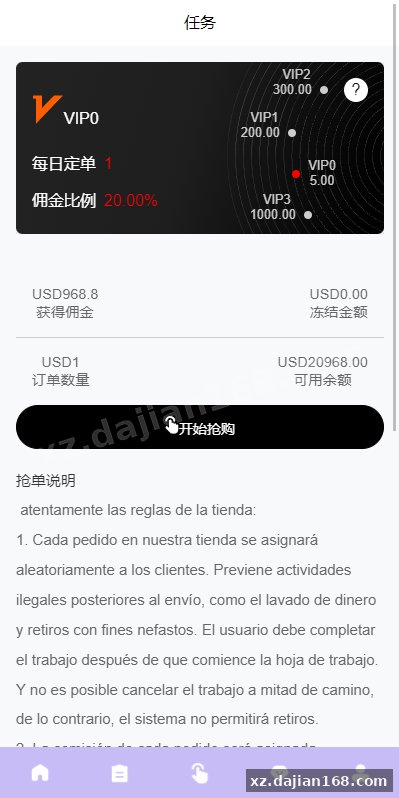


Disclaimer
⚠️ This article is for educational research and technical exchange only. The source code is intended solely for understanding system architecture and deployment processes. Do not use it for illegal purposes. Any commercial operation is unrelated to the author.