2026 Google Chrome Virus Warning Red Alert Blocked Dangerous Website Solution
2026 Google Chrome Browser Virus Warning and Blocking Solutions
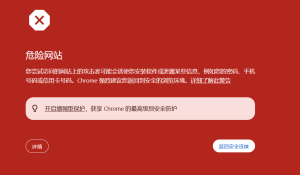
Some programs will show virus warnings and mark the site as dangerous immediately after you change the domain name. For the frontend, you either need to change everything completely or block Google Chrome. Below is my temporary solution:
1. Configuration File Blocking:
# Detect Chrome browser and return 404
if ($http_user_agent ~* (chrome|crios)) { return 404; }
# Block Google’s crawlers and security detection IP ranges
# Google Bot IP ranges
deny 66.249.64.0/19;
deny 64.233.160.0/19;
deny 72.14.192.0/18;
deny 203.208.32.0/19;
deny 74.125.0.0/16;
deny 216.239.32.0/19;
deny 209.85.128.0/17;
# Google Safe Browsing detection
if ($http_user_agent ~* (Google-Safety|Googlebot|Mediapartners-Google)) { return 403; }
2. Robots.txt Blocking:
User-agent: Googlebot
Disallow: /
User-agent: Google-Safety
Disallow: /
User-agent: *
Disallow: /
3. Google IP Blocking:
deny 66.249.64.0/19;
deny 64.233.160.0/19;
deny 72.14.192.0/18;
deny 203.208.32.0/19;
deny 74.125.0.0/16;
deny 216.239.32.0/19;
deny 209.85.128.0/17;
deny 173.194.0.0/16;
deny 216.58.192.0/19;
4. Create a navigation page or redirect page that first identifies the browser. If it’s not Google Chrome, redirect normally.
*Only partial code is shown here. You can get the complete version from me. TG: @dajian168*
**************
“`php
// Read domain list
function getDomains() {
$file = ‘domains.txt’;
if (!file_exists($file)) {
return [‘https://www.example.com’]; // Default domain
}
$domains = file($file, FILE_IGNORE_NEW_LINES | FILE_SKIP_EMPTY_LINES);
return array_filter($domains);
}
// Detect browser language
function getBrowserLanguage() {
$lang = isset($_SERVER[‘HTTP_ACCEPT_LANGUAGE’]) ? $_SERVER[‘HTTP_ACCEPT_LANGUAGE’] : ‘en’;
$lang = substr($lang, 0, 2);
return in_array($lang, [‘zh’, ‘cn’]) ? ‘zh’ : ‘en’;
}
$domains = getDomains();
$lang = getBrowserLanguage();
$domainsJson = json_encode($domains);
?>
“`
“`css
* {
margin: 0;
padding: 0;
box-sizing: border-box;
}
body {
font-family: -apple-system, BlinkMacSystemFont, “Segoe UI”, “Microsoft YaHei”, Arial, sans-serif;
background: linear-gradient(135deg, #667eea 0%, #764ba2 100%);
min-height: 100vh;
display: flex;
align-items: center;
justify-content: center;
padding: 20px;
}
display: none;
max-width: 500px;
width: 100%;
background: #ffffff;
border-radius: 16px;
box-shadow: 0 20px 60px rgba(0, 0, 0, 0.3);
overflow: hidden;
animation: slideIn 0.4s ease-out;
}
@keyframes slideIn {
from {
opacity: 0;
transform: translateY(-30px);
}
to {
opacity: 1;
transform: translateY(0);
}
}
.header {
background: linear-gradient(135deg, #f093fb 0%, #f5576c 100%);
padding: 30px;
text-align: center;
color: white;
}
.shield-icon {
width: 80px;
height: 80px;
margin: 0 auto 15px;
background: rgba(255, 255, 255, 0.2);
border-radius: 50%;
display: flex;
align-items: center;
justify-content: center;
font-size: 40px;
}
.header h1 {
font-size: 24px;
margin-bottom: 10px;
font-weight: 600;
}
.header p {
font-size: 14px;
opacity: 0.9;
}
.content {
padding: 35px 30px;
}
.warning-box {
background: #fff3cd;
border-left: 4px solid #ffc107;
padding: 15px;
margin-bottom: 25px;
border-radius: 4px;
}
.warning-box p {
color: #856404;
font-size: 14px;
line-height: 1.6;
}
.section-title {
font-size: 16px;
font-weight: 600;
color: #333;
margin-bottom: 15px;
display: flex;
align-items: center;
}
.section-title::before {
content: “✓”;
display: inline-block;
width: 20px;
height: 20px;
background: #28a745;
color: white;
border-radius: 50%;
margin-right: 8px;
font-size: 12px;
text-align: center;
line-height: 20px;
}
.browser-list {
display: grid;
gap: 12px;
margin-bottom: 25px;
}
.browser-item {
display: flex;
align-items: center;
padding: 12px 15px;
background: #f8f9fa;
border-radius: 8px;
text-decoration: none;
color: #333;
transition: all 0.3s ease;
border: 2px solid transparent;
}
.browser-item:hover {
background: #e9ecef;
“`
-
 Alipay QR Code Scan
-
 WeChat Scan Pay