Ride-Hailing System Build Log: uniapp Dual-Client + Fastadmin Backend Deployment Notes
Ride-Hailing System Build Log: uniapp Dual-Client + Fastadmin Backend Deployment Notes
Disclaimer: This article is for technical education and demonstration only. It is not professional or financial advice. Any real-world deployment must comply with applicable laws and regulations.
Last week I helped a client who runs a local mobility service get this ride-hailing system live: the passenger app and the driver app are both uniapp, and the backend is Fastadmin. The requirements weren’t fancy — three entry points (in-city booking, shared rides, designated driver), with one codebase per side compiling to a WeChat mini program and a native App. From unzipping the source to a successful first order took three days, and about half of one of those days disappeared into map permissions and payment callbacks. What follows is the sequence I actually followed, so the next person doesn’t burn the same hours.
1. What This System Actually Runs
Break the structure down first, or your code changes turn into a mess. The source splits into three parts: passenger client, driver client, and backend. Both clients are uniapp projects — a single codebase compiles to a WeChat mini program, H5, and Android/iOS packages. The driver side calls a few extra native capabilities, such as continuous positioning, background order reception, and jumping out to third-party navigation. When packaging, you have to tick the location permission and background-running permission in the manifest, otherwise the app drops offline the moment the screen goes dark.
Directory differences between the two clients
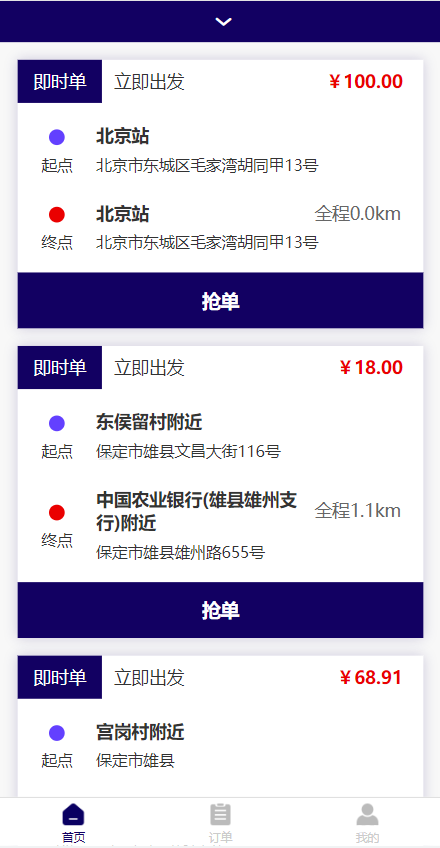
The two clients share a lot of components — fare display, order cards, rating popups — and I pulled the common parts into components so a style change happens in one place. The driver client has a separate task distribution page that receives nearby order pushes over a WebSocket long connection: the server pushes the list of nearby pending orders every 5 seconds and the client runs a countdown. If Redis isn’t installed on the server, the connection keeps failing at the handshake stage, and the error message is vague enough that you only spot it in the runtime log.
How far the backend can manage things
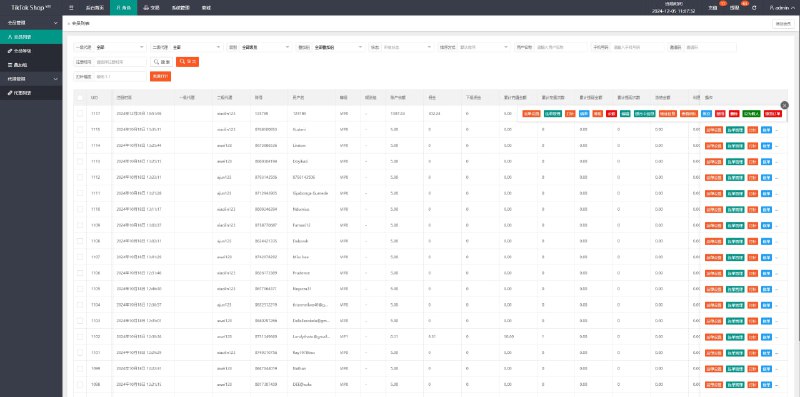
Once you know Fastadmin, this part is straightforward — menus, permissions, and CRUD are all built in. The critical pieces here are: driver onboarding review (license, vehicle registration, and car photos reviewed by hand, with a blacklist option), pricing rules (base fare, distance fee, time fee, night multiplier, and supply-demand adjustment coefficient all as configurable forms, no code edits needed), order management (trip track points, cancellation reasons, refund records), and fund flow (passenger payments, driver settlements, and platform commission tracked in three separate columns). There’s also a coupon and referral reward config, which makes acquisition campaigns easy to run.

2. Deployment Points: The Order I Actually Used
Environment and directories
I ran CentOS 7 with the BT panel, pinned PHP at 7.4 (this Fastadmin build throws errors on some extension methods under 8.x, so don’t force the upgrade), MySQL 5.7, Redis 6, and Nginx with pseudo-static rewrite rules enabled. Drop the source into the site root and run the install wizard; afterwards, delete the install directory by hand or you’ll get a security warning. Set the database charset to utf8mb4 across the board, otherwise emoji in driver nicknames get stored as question marks.
Maps and payments are where people get stuck
I configured Tencent Maps, filled in the Key in the backend, and also had to whitelist the request, uploadFile, and socket domains on the mini program side. wx.getLocation now requires an interface permission application, and the ride-hailing category needs qualification documents, so during local debugging I usually run the H5 build first, get the flow working, and switch to the mini program once the paperwork clears.
For payments I wired up WeChat Pay V3 and Alipay APP Pay. V3 needs the merchant ID, APIv3 key, and certificate files, and the callback URL must be https with no parameters attached. My first attempt included a query string and the callback returned 404 for a solid half hour. On the Alipay side, the main trap is mixing up the app private key and public key — finish testing in the sandbox before switching to production.
Highlight: pricing rules and commission ratios all live in backend config tables, so changing a parameter doesn’t require a new release; driver review and trip tracks are visible on the same backend page, which makes triaging customer complaints much faster.

3. Custom Development and Multi-Language
The client later asked for a corporate travel module: company accounts pre-load a balance, employees book against monthly settlement, and no online payment happens. The approach was to add a biz_id field to the orders table, have the payment callback check the type and mark the order paid without charging, then settle through the backend reconciliation statement. Small change, about two hours of work.
For multi-language I used uniapp’s built-in i18n plus Fastadmin’s lang directory: front-end language packs go in locales, backend error messages go in application/lang. Watch the date formats and currency units — in English the amount needs two decimal places, or the yuan unit leaks through. If the database has Chinese field descriptions, convert them to language keys instead of storing Chinese directly.

4. Who Should Pick This Up
Small teams wanting to run their own local mobility service, startups doing same-city designated driver work, and system integrators who need to bolt a booking entry onto an existing business — this stack fits all of them. The prerequisite is someone who can read ThinkPHP controller logic; total beginners should walk through the order flow in the backend first before touching code. A 2-core 4GB server is enough for testing, but for production I usually recommend 4 cores and 8GB with Redis deployed separately — driver location reporting comes in fast and the database load is heavier than you’d expect.
FAQ
Q: The driver client in the mini program stops receiving new order pushes after the screen goes dark. What now?
A: The mini program suspends WebSocket connections in the background — that’s a platform limit. The workaround is subscription messages: when a driver is assigned an order, the server sends a subscription message, and tapping it pulls the fresh list. The App build doesn’t have this problem; a long connection plus a foreground service keeps it stable.
Q: I only want the passenger mini program and a driver App. Can I split the compilation?
A: Yes. The two projects are independent to begin with — compile the passenger side to a mini program and package the driver side as an Android build. Just note you’ll need two sets of API domains: the mini program one must be filed and https, while the App can reuse the same domain.
Q: If I change pricing rules in the backend, do in-progress orders change with them?
A: No. At order creation the current pricing parameters are snapshotted into the orders table, and the trip is calculated from that snapshot. Backend edits only affect new orders. This design matters — mid-trip price changes are a fast route to disputes.
Q: Does the system support operating in multiple cities?
A: Yes. The backend configures pricing templates and service areas per city, using polygon geofences to define regions. Drivers pick a city at registration and can’t accept orders outside their fence.
One last note: using the source for technical demos and your own business is fine, but follow local laws and regulations, and don’t use it for anything unlawful. Before going live, make the driver qualification review and trip recording authorization solid — don’t skip that because it’s tedious.
Disclaimer: This article is for technical education and demonstration only. It is not professional or financial advice. Any real-world deployment must comply with applicable laws and regulations.
#Ride-hailing system #uniapp #Fastadmin #Mini program development #Deployment notes
-
 Alipay QR Code Scan
-
 WeChat Scan Pay