Multi-Region Access Control & Payment Gateway Demo: Build Log and Deployment Notes
Multi-Region Access Control & Payment Gateway Demo: Build Log and Deployment Notes
Disclaimer: This article is for technical education and demonstration only. It is not professional or financial advice. Any real-world deployment must comply with applicable laws and regulations.
Recently I helped a client running a cross-border e-commerce demo environment deploy a system that combines multi-region access control with a payment gateway demo. His original request was plain enough: visitors from different countries should see pages in different languages, the payment step needed to run through a sandbox flow for demonstration, and the admin side had to control who was allowed to edit the rules. Sounds simple. It wasn’t, especially real IP detection and rule priority. This post is my deployment log exactly as it happened, parameters and pitfalls included, so you can run through it yourself.
1. What the system actually does (hands-on testing)
After installing I ran the whole flow once. Overall it went smoother than I expected. Let me break down the core modules.
1.1 Regional access rule engine
From the admin you can build rules on three dimensions: country, province, and IP range. Each rule carries one action: allow, redirect to a specified language page, or block to a notice page. Rules have a priority field, and the lower the number the earlier it matches. That detail matters. I didn’t set priorities at first, and one broad continent-level rule swallowed every fine-grained city rule. Took me half an hour to work out what was going on. The rule store uses a local GeoIP2 database with offline lookups, roughly 1 to 3 ms per resolution, so 100k daily visits is no problem at all.
1.2 Payment interface sandbox demo
This part is for demonstration only. It connects to a test-environment channel and no real funds move. The admin lets you configure the endpoint URL, key, and callback URL, and supports both async notification and synchronous redirect returns. In testing I used simulated order numbers with fixed amounts; running the full chain you can watch the status move from pending to success. Callback logs get their own page in the admin, complete with request payloads and response codes, which makes troubleshooting integration issues painless. One note: the callback URL must be publicly reachable. A local localhost address will never receive notifications, and that’s where beginners get stuck most often.
1.3 Admin control and multi-language
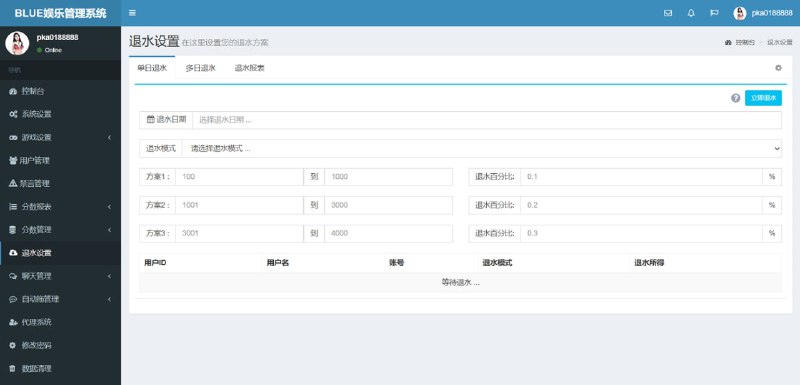
The admin uses a standard role-permission model with three built-in roles: administrator, operator, and read-only. Permission points go down to individual menus and buttons. Language packs are standalone JSON files in the lang directory, so adding a language means copying a file and editing the values. The frontend matches automatically by visitor region, and visitors can also switch manually, with their choice remembered. When extending, just add fields to the language pack, no template changes needed.
Highlight: the priority field in the rule engine and the hot-swappable language packs are the two most practical designs in this system. The first determines whether blocking is accurate; the second determines how painful adding languages later will be. Test both thoroughly before going live.
2. Deployment essentials and the pitfalls I hit
Environment and basic configuration
I used PHP 8.1 with MySQL 5.7, Nginx up front, and Redis caching the rule table. Before installing, get the PHP geoip extension or the composer GeoIP2 library in place. Without it, region detection throws errors immediately. After importing the database, remember to change the connection info and keys in config, and always replace the defaults. I’ve seen several deployments where people forgot.
Getting the visitor’s real IP
This is the biggest pitfall. When the system runs behind an Nginx reverse proxy, it reads internal IPs, so region detection is wrong across the board. The fix is to configure real_ip_header and set_real_ip_from in Nginx, whitelist the upstream nodes, then take the first valid value from X-Forwarded-For in your code. After configuring, test with an actual overseas node. Don’t assume it works just because it passed locally.
Rule table indexes and caching
I added a composite index on country and priority, and queries dropped from 200-plus milliseconds to a few milliseconds. Clear the Redis cache after rule changes. I wrote an admin button to trigger it so I don’t have to do it by hand every time. For the log table, I’d recommend monthly partitioning or periodic archiving. Otherwise after two or three months you’re sitting on hundreds of thousands of rows and the list page visibly slows down.
3. Who it suits, and how to start extending it
This fits cross-border site demo environments, ops teams that need region-based content distribution, and developers who want an existing admin panel to practice on. The code structure is reasonably clear, with controllers, models, and views kept separate, so adding features doesn’t mean hunting all over the place.
Common extension directions
- Swap region rules for device-type or traffic-source matching; you only change one evaluation method.
- Add a channel adapter layer to the payment demo module; a new channel just extends the base class and implements two methods.
- Add operation auditing to the admin to record who changed which rule and when; the field table already has room reserved.
- Hook multi-language up to a third-party translation API for semi-automatic filling, which can save more than half the data-entry time.
FAQ
Q: After deployment the frontend says region resolution failed. What do I check?
A: First verify the GeoIP database path is correct, then whether the server can read the file. Most cases come down to a wrong path or insufficient file permissions, and the log will show a clear error.
Q: Why do payment callbacks never arrive?
A: Nine times out of ten the callback URL isn’t publicly reachable, or a firewall is blocking it. Use an online tool to test whether the address is reachable from the internet, then check the interface config for stray spaces in the URL.
Q: Why do people in the same region see different languages?
A: Check rule priority. A broad rule is probably overriding a precise one. Also, manual language switches are remembered, so clear local storage when testing.
Q: Do I need to restart services after editing rules in the admin?
A: No. Click the clear-cache button and the rules reload on the next request. Only config-file changes require reloading the PHP process.
One last note: this article documents a technical deployment process only. The system is intended for demonstration and learning purposes. Please follow applicable laws and regulations and do not use it for any unlawful purposes.
Disclaimer: This article is for technical education and demonstration only. It is not professional or financial advice. Any real-world deployment must comply with applicable laws and regulations.
#Source Code Deployment #Regional Access Control #Payment Gateway #Admin Panel #Extension Notes
-
 Alipay QR Code Scan
-
 WeChat Scan Pay