BiliGo V3 Ultra Source Code for Multi-Platform AI Auto-Reply System
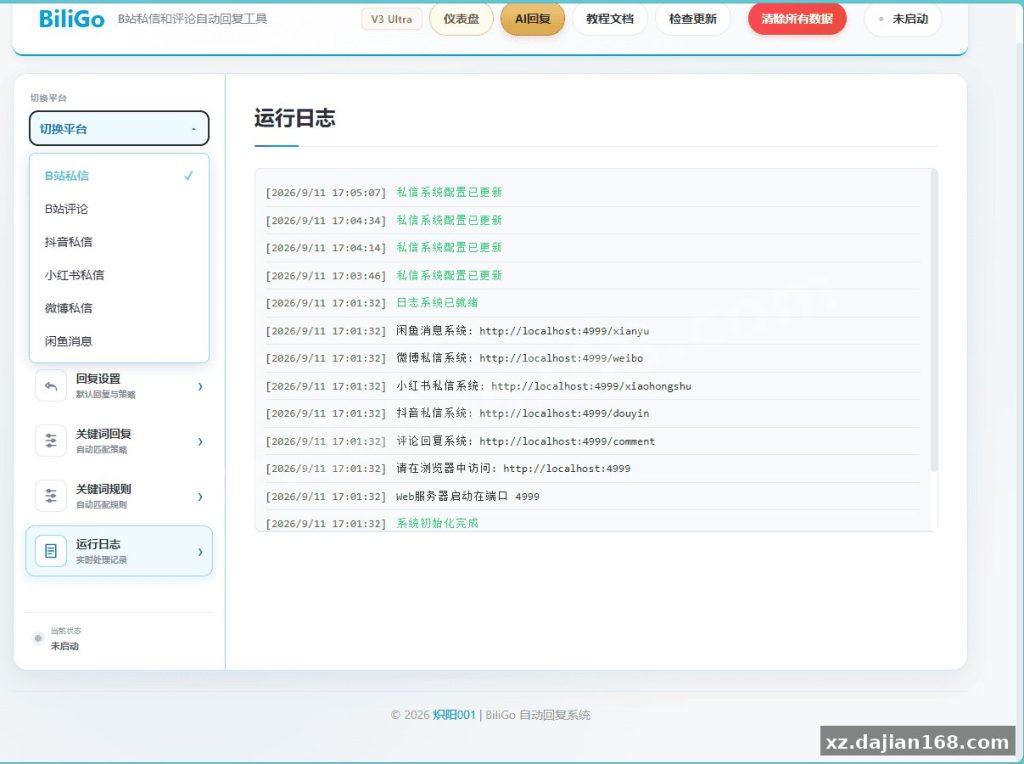
Looking for a source code download of a multi-platform messaging automation tool? BiliGo V3 Ultra is an open-style auto-reply system that pulls six message channels — Bilibili private messages, Bilibili comments, Douyin, Xiaohongshu, Weibo, and Xianyu — into a single web dashboard. It combines keyword-rule replies with AI-powered responses, making it a useful reference project for anyone studying Communication System architecture or building customer-service bots. You can download the full source package on dajian168 for educational research and architecture review.
From an engineering standpoint, the interesting part is how it isolates each platform’s login state, config, statistics, and logs — six sandboxes under one roof, rather than one fragile shared session. That alone is worth reading the code for.
Key takeaway: the dual reply engine (keyword rules + AI) is what makes this architecture worth studying
When I deployed this for testing, the reply pipeline split cleanly into 2 modes, selectable per platform:
- Keyword rules (mode 1): default reply + keyword triggers, with follower/non-follower differentiation, per-user reply-count limits, and configurable send intervals to reduce risk-control flags. Bilibili DM supports image replies too.
- AI customer service (mode 2): 3 provider options — OpenAI, Anthropic, or any custom OpenAI-compatible endpoint. Multiple knowledge bases can be assigned per platform, conversation context is auto-compressed to save tokens, and a built-in banned-word filter blocks unsafe output. Sessions the AI can’t handle reliably fall into a manual pending queue.
Actionable takeaway: before trusting the AI mode, check the context-compression setting in the admin panel — if your knowledge base is large, compressed prompts can drop critical product details. Start with keyword rules on high-frequency questions and route only the long tail to AI.
Key takeaway: 3 deployment paths, and the Docker image with bundled Chromium saves you the most pain
In testing I found the browser-automation layer depends on a real Chromium instance, so the deployment method matters more than usual:
| Method | Best for | Note |
|---|---|---|
| Run from source | Code review, customization | Requires manual environment setup |
| Docker image (full version) | Server deployment | Includes built-in Chromium — no browser install |
| Windows single-file EXE | Local personal use | Fastest to start, least flexible |
Deployment checklist:
- Download the package from dajian168 and verify the default config contains no credentials — the repo ships credential-free by design.
- Prefer the Docker full build; missing Chromium is the #1 startup failure I hit when running from bare source.
- Configure email alerts for login-expiry and runtime errors — without them you’ll discover dead sessions from missed replies, not logs.
Key takeaway: 4 operational safeguards you should verify before actually running it
- New-messages-only processing: it ignores all history after startup — no accidental mass-reply to old conversations. Confirm this flag is on before you start the service.
- Credential-safe export: rules can be imported/exported across platforms, and the export strips cookies and tokens. Worth checking the export file yourself.
- Built-in dashboard: tracks reply volume and success rate across all 6 platforms, so you can spot a failing channel within hours, not days.
- Isolated sessions: one platform’s login failure doesn’t cascade to the other five.
Judging criterion: if a similar tool lacks per-platform isolation and banned-word filtering, treat it as higher-risk regardless of feature count.
Key takeaway: who this source code fits — and the limits to respect
Suitable project types for studying this codebase: multi-account management dashboards, e-commerce customer-service bots, and social-media operations tools. All automation should run at controlled frequency, respect each platform’s rules, and stay within personal efficiency and learning-research use.
FAQ
Q: Does BiliGo V3 Ultra reply to old messages after I start it?
A: No. It only processes messages received after startup, so historical conversations are never batch-replied — verify this behavior in the logs on first run.
Q: Can I use my own AI endpoint instead of OpenAI?
A: Yes. The admin panel accepts any OpenAI-compatible API base URL and key, so self-hosted or third-party compatible providers work as provider option 3.
Q: Is the rule export file safe to share?
A: The export excludes cookies and other sensitive credentials, but inspect the JSON before sharing anything across machines.
System Screenshots
Original screenshots:
Disclaimer
⚠️ This article is for educational research and technical exchange only. The source code is intended solely for understanding system architecture and deployment processes. Do not use it for illegal purposes. Any commercial operation is unrelated to the author.