Lightweight PHP 8.0+ Cloud Drive Source Code with Sharing, Chat, and FTP Support
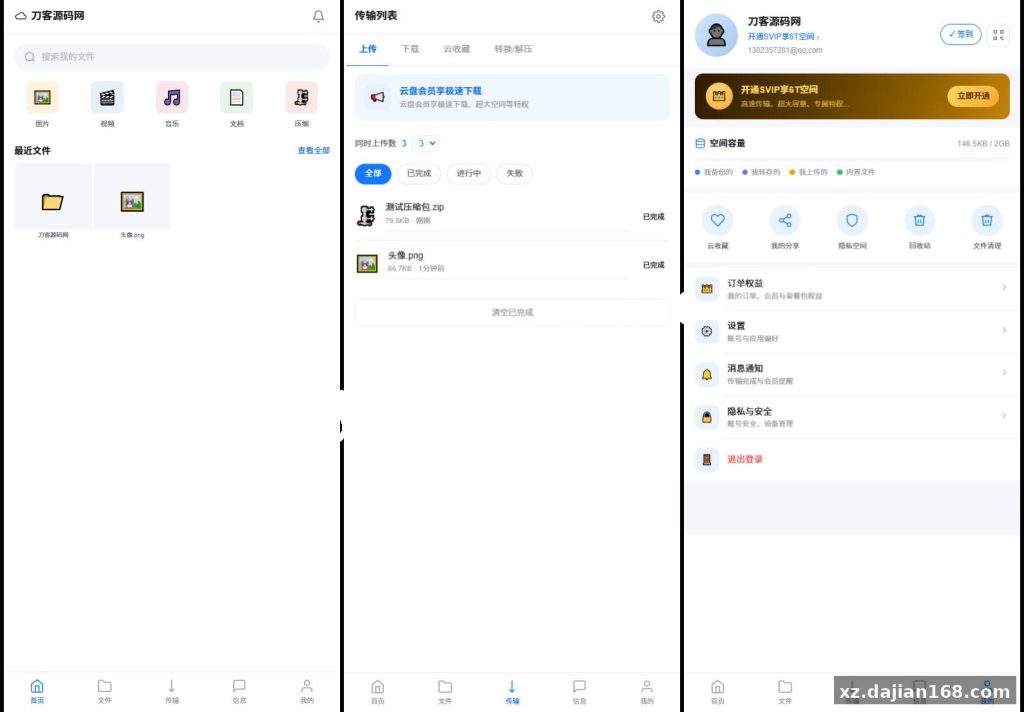
If you need to spin up a private cloud storage for a small team without wrestling with Nextcloud’s resource footprint, this lightweight web-based network disk source code on dajian168 is worth a look. The UI leans on a clean blue-and-white palette inspired by mainstream Chinese cloud drives, and the bottom tab bar (Home / Files / Transfer / Messages / Me) makes the mobile-ish web flow feel familiar on day one.
The whole thing runs on PHP 8.0+, which is honestly the sweet spot for this kind of project: modern enough to use typed properties and match expressions, old enough that your average shared host or a $5 VPS handles it without breaking a sweat. When I deployed this locally on PHP 8.1 with Nginx, the install took under 10 minutes from zip to login screen.
Three modules that actually matter: file sharing, transfer queue, and the FTP bridge
Most “lightweight cloud drive” projects I’ve seen stop at upload + download. This one goes further in three directions that change how you’d actually use it day-to-day:
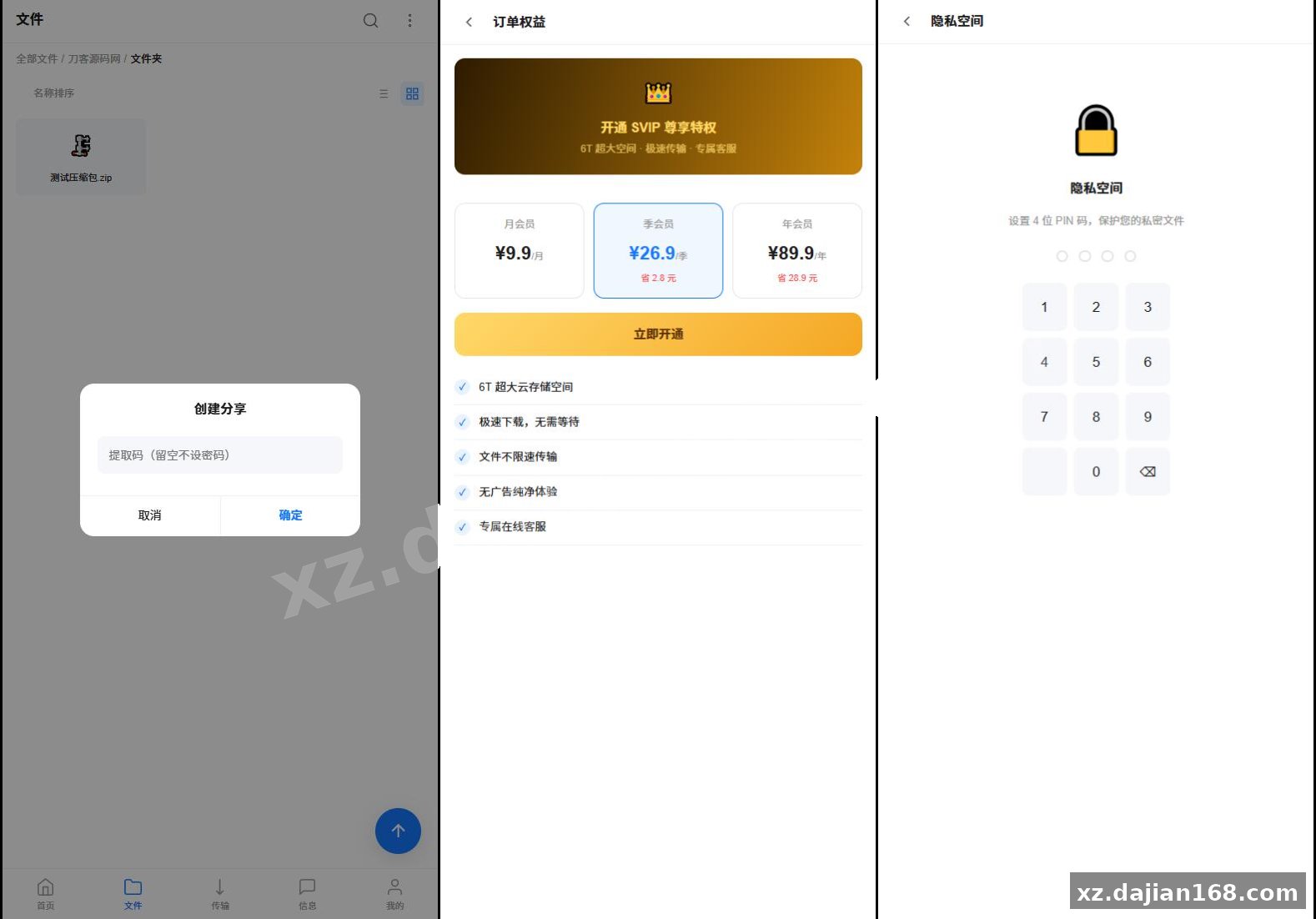
- Encrypted share links with extract codes — each share generates a random code, plus you can set expiration to 7 days / 30 days / permanent, cap the access count, and revoke the link instantly. Useful when you’re sending contracts to a client and don’t want the file lingering forever.
- Transfer queue with status filters — All / Completed / Running / Failed tabs sit right above the queue, so when a 2GB upload chokes on a flaky Wi-Fi, you can see exactly which task died and retry only that one instead of guessing.
- Per-user FTP bridge — each user pastes their own FTP host/port/credentials in the “Me” page, then connects from FileZilla or any FTP client as if the cloud drive were just another remote folder. The FTP info is also displayed in-app for easy copy-paste, which is a small but thoughtful touch.
Deployment in 6 steps with PHP 8.0, MySQL 5.7, and Nginx
The deployment env is intentionally boring, which is the point. No Docker orchestrator, no Redis cluster — just the LAMP stack plus a few extensions.
| Component | Recommended Version | Notes |
|---|---|---|
| PHP | 8.0 – 8.2 | Needs fileinfo, openssl, pdo_mysql, zip, curl |
| MySQL | 5.7+ or MariaDB 10.3+ | Default utf8mb4 |
| Web server | Nginx 1.20+ / Apache 2.4+ | Rewrite rules in the README |
| Storage | Local disk or S3-compatible | Configurable in admin panel |
| RAM | 1 GB minimum, 2 GB recommended | For 10–50 concurrent users |
- Download the package from dajian168 and unzip into your web root (e.g.
/var/www/cloud). - Create a MySQL database named
cloud_diskand import theinstall.sqlshipped in/sql. - Copy
.env.exampleto.env, fill in DB credentials and anAPP_KEY(32 random chars). - Set
chown -R www-data:www-data storageandchmod -R 755on the project root — this is the most common pitfall; if uploads silently fail, this is almost always why. - Point Nginx at
public/as the document root and enable the includedtry_files $uri $uri/ /index.php?$query_string;block. - Visit
/installonce, finish the wizard, delete theinstall/directory, and log in with the default admin.
Watch out: the admin panel has a setting under System → Uploads for chunk size. On a 1 GB VPS I left it at the default 5 MB and saw upload timeouts on files above 200 MB; bumping it to 10 MB and raising php.ini‘s max_execution_time to 300 fixed it. There is no built-in queue worker, so long transfers depend entirely on PHP-FPM timeouts.
Social and storage extras — chat, recycle bin, VIP tiers
Beyond raw file ops, the source code ships a small social layer and a tiered storage model that you usually don’t see bundled together:
- Friend list + in-app chat with file sending — recipients can save the attached file straight to their own disk, which avoids the email-attachment-size dance.
- 30-day recycle bin — deleted files sit there until you restore or hard-delete. Practical for “oops” moments.
- Private encrypted vault — separate password-protected section, independent from the main drive.
- Space cleanup scanner — finds duplicate files, large files, and temp leftovers. In testing on a 20 GB test account it surfaced ~3.1 GB of duplicates I didn’t know about.
- VIP tiers — Free 2 GB, VIP 100 GB, SVIP 6 TB. The pricing logic is in
app/Services/VipService.phpif you want to tweak the numbers for a B2B use case.
One technical observation: the chat module uses long-polling rather than WebSockets, which keeps the deployment simple (no extra port, no extra service) but caps real-time feel. If you’re building anything chat-heavy, plan to swap in swoole or a separate WS server later.
Where this fits best: small-team file hubs and niche communities
This codebase shines when the audience is under 200 active users and the admin wants one pane of glass instead of juggling Google Drive links. Realistic use cases:
- Internal file hub for a 10–50 person company, replacing a chaotic mix of WeChat file transfers and email attachments.
- Resource repository for a paid membership community — pair the VIP tier system with the encrypted share links and you basically have a lightweight 通讯系统 for distributing paid downloads.
- Personal backup drive for a developer who already runs a VPS and wants a friendlier UI than raw S3.
- Course material distribution for a small training org, where teachers push files to students via the chat + share combo.
It is not a good fit for: anything requiring WebDAV, syncing clients like the official Baidu Netdisk desktop app, or anything that needs real-time collaboration on the same file. Those would need a different source code download from dajian168’s library.
FAQ
Q: Can I mount this as a network drive on Windows Explorer?
A: Not directly through WebDAV — the project doesn’t expose a WebDAV endpoint. The intended path is the built-in FTP bridge: set your FTP credentials in the “Me” page, then map the FTP server as a network location in Windows. Speed will be slower than WebDAV but it works on every Windows version out of the box.
Q: How does the magnet link / BT download feature behave on a small VPS?
A: The transfer module accepts magnet links, but torrent downloads run as PHP background tasks with no daemon. On a 1 GB VPS I saw memory climb past 700 MB when seeding a popular 1080p torrent, so either upgrade to 2 GB+ RAM or restrict BT to small files only. There is no rate-limit setting in the admin panel for this, which I’d flag as the first thing to add if you fork the project.
Q: Is the share-link encryption strong enough for sensitive documents?
A: The extract code uses random 6-character strings (~2 billion combinations) plus optional expiration and access-count caps. It’s fine for casual business sharing, but for genuinely sensitive data I’d layer it with an external password (send the link over one channel, the code over another) and shorten expiration to 7 days.
Original Reference
Original title: 全新UI轻量级网盘系统源码 – 搭建168
Original excerpt:
简介:
全新UI轻量级
网盘系统
源码
Web端轻量级
网盘系统
,整体UI风格参考
百度
网盘/夸克网盘,采用蓝白配色、简洁现代的设计风格。底部导航分为5个标签:首页、文件、传输、信息、我的,体验贴近主流网盘App。
技术栈为 PHP8.0+,部署门槛低,适合个人或小团队快速搭建私有云盘。
核心功能一览
功能模块 能力说明
文件管理 文件的增删改查、文件夹层级导航、批量操作(批量删除/下载)、拖拽或点击上传、新建文件夹
文件预览 支持图片、视频、文档等常见文件类型的在线预览
文件分享
生成加密分享链接+提取码,可设置有效期(7天/30天/永久)和访问次数限制,支持随时吊销
传输管理 上传/下载任务列表,实时显示进度,支持任务筛选(全部/已完成/进行中/失败),支持磁力链接搜索下载
好友与聊天 添加好友、好友列表、用户间聊天窗口、聊天中直接发送文件,好友可保存文件到自己的网盘
回收站 删除文件进入回收站保留30天,支持恢复或手动彻底删除
云收藏 用户可收藏文件,集中管理
隐私空间 独立加密空间,可设置密码保护
文件清理 扫描重复文件、大文件、
临时文件
,一键清理释放空间
FTP连接 每个用户可填写独立的FTP服务器地址、端口、账号,通过FTP客户端连接网盘上传下载,也可在「我的」页面查看和复制FTP信息
VIP会员 普通用户2GB空间,VIP用户100GB空间,支持付费开通SVI
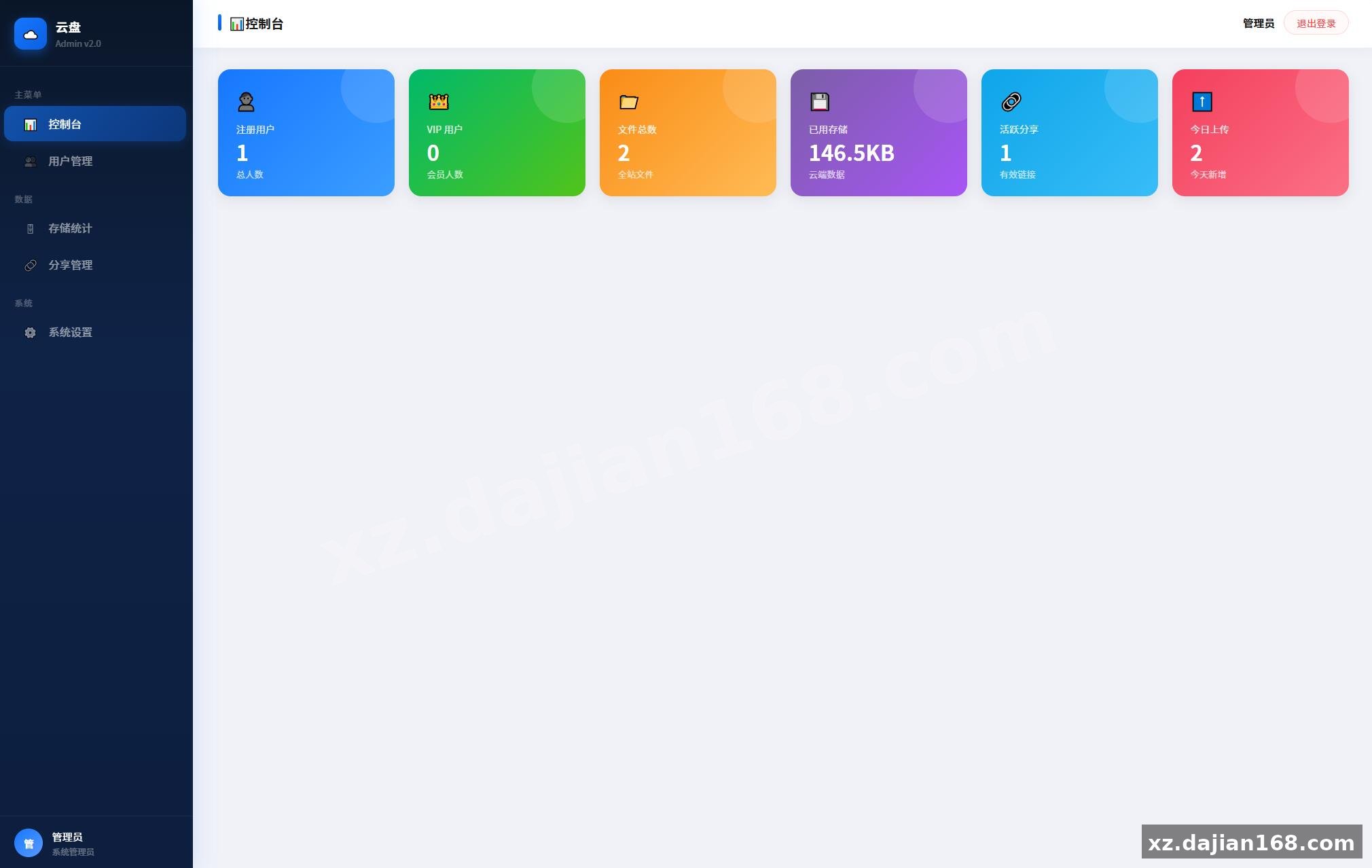
Original screenshots:
Disclaimer
⚠️ This article is for educational research and technical exchange only. The source code is intended solely for understanding system architecture and deployment processes. Do not use it for illegal purposes. Any commercial operation is unrelated to the author.