Seven-Digit Number Simulation System Build Log: Probability Demo Platform Deployment Notes
Seven-Digit Number Simulation System Build Log: Probability Demo Platform Deployment Notes
Disclaimer: This article is for technical education and demonstration only. It is not professional or financial advice. Any real-world deployment must comply with applicable laws and regulations.
I recently helped a client deploy a random number demo system for seven-digit number simulations, complete with a standalone referral hierarchy and a visual backend for parameter configuration. The client’s requirement was clear: purely for technical demonstration, to study random number generation logic and probability distribution curves. After two days of tinkering, here’s the whole process and the pitfalls I hit, for anyone with a similar deployment need.

Feature Testing: What This System Can Actually Do
Bottom line up front: the feature set turned out to be more complete than I expected. The core is a probability simulation engine — the backend lets you adjust the number-drawing probability weights for each mode, and the frontend renders the result announcement animation in real time. Here’s what I focused on testing:
Random Number Engine
The underlying generation is server-side, not computed in frontend JS — and that matters, because frontend computation is easy to tamper with locally. I sniffed the packets: every round’s data comes down through the API with a signature check. The backend has a “random number strategy” panel where you can switch between pseudo-random algorithm modes, which works nicely for teaching demos.
Standalone Referral System
The referral module is a three-tier structure: top-level agent → agent → member. Each agent gets an independent promo link, an independent settlement panel, and configurable commission rates. I ran the full register → promote → settle flow with a test account; the commission stats were accurate, and reports export to Excel by day/week/month.
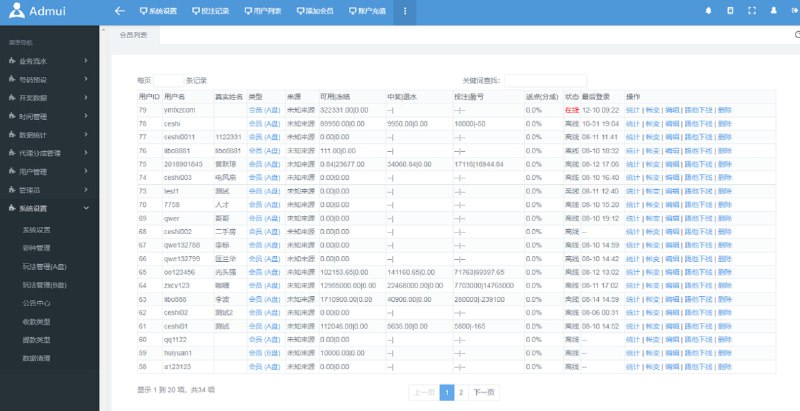
Backend Control Panel
The backend is built with Layui. The menu includes: round number management, mode configuration, probability weights, member management, agent management, report center, and system settings. In mode configuration, the digit count for the seven-digit simulation is adjustable from 1 to 7, and the number range for each digit is customizable too — decent flexibility.

Deployment Essentials: Environment Setup and Pitfall Log
Environment Requirements
The code is written in PHP. In my testing, PHP 7.4 + MySQL 5.7 + Nginx ran the most stable. Don’t use PHP 8 — there’s a fair amount of legacy syntax in the code, and 8.0 throws a pile of deprecation warnings. For URL rewriting, use the ThinkPHP rules; you can pick them directly in the BaoTa panel.
Installation Steps
1. Upload the source to the site root and import the SQL file;
2. Edit the database config file (at application/database.php);
3. The backend entry is /admin — default credentials are in the install instructions, and the first thing to do after logging in is change the password;
4. The cron job is mandatory. Use BaoTa’s scheduled task to run a shell script every minute that handles round advancement and data settlement. I skipped this at first and the frontend round number just sat there frozen — took me half an hour to figure out why.
Pitfalls I Hit
The biggest trap was the payment interface module. The system reserves a reel simulation for an aggregated payment interface but ships with no default merchant config, so you either integrate a third party yourself or switch it to simulation mode for demos. I simply added a mock payment class under application/common/controller with a local callback, and the demo flow worked right away. Also, definitely set up HTTPS — the API signature check occasionally hits cross-origin issues over plain HTTP.

Customization Advice: Where to Get the Most Bang for Your Buck
If you’re planning secondary development, I’d start with these directions:
First, the frontend templates. The default theme looks dated. The view layer lives in the template directory with a clean structure — swapping in a new UI is roughly two to three days of work.
Second, multilingual support. The system ships with a language pack mechanism; drop a language file into the lang directory and you’re extended. Handy for Southeast Asian market demos — I added English and Vietnamese packs for my client in half a day.
Third, the reporting system. The built-in reports are functional but not polished. If your data volume is large, consider moving the stats queries to read/write separation, or put Redis in front of hot round data — in my testing it handled noticeably more concurrency.
Highlight: the probability weight configuration takes effect in real time — change a parameter and the very next round runs on the new logic. That makes it extremely intuitive for teaching probability distributions, and it’s the main reason I’d recommend it.
Who This Is For
Three groups will find this useful: institutions teaching probability and statistics that need a realistic random number demo environment; dev teams taking on customization gigs — the code structure is tidy, so the cost of modification is low; and developers who want to study the architecture of a referral distribution system — its three-tier agent structure and commission settlement modules are fairly complete and worth dissecting.

FAQ
Q: What server specs do I need?
A: For a demo environment, 2 cores / 4 GB is plenty — I tested with 200 concurrent online users without strain. If you expect real user volume, start at 4 cores / 8 GB and tune MySQL caching separately.
Q: Is the source encrypted? Can I modify it?
A: All core files are open and unencrypted; only a couple of license-verification files are obfuscated, which can be handled normally for local deployment. There’s plenty of freedom for customization.
Q: The cron job isn’t running — what now?
A: Nine times out of ten it’s a PHP path issue. In BaoTa’s scheduled task, use an absolute path like /usr/bin/php /www/wwwroot/your-site/think queue:work — never a relative path.
Q: Does it support mobile?
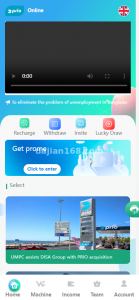
A: The frontend is responsive H5 that adapts to phones and PCs. There’s no native app; if you need one, you can wrap the H5 or rebuild the frontend with uni-app.
One last note: this system is for technical learning and probability simulation demonstration only. Deploy and use it in compliance with applicable laws and regulations, and never for any unlawful purpose. If you run into deployment issues, feel free to ask in the comments — I reply to everything I see.
Disclaimer: This article is for technical education and demonstration only. It is not professional or financial advice. Any real-world deployment must comply with applicable laws and regulations.
#Source Deployment #Random Number Demo #Probability Simulation #PHP Deployment #Referral System
-
 Alipay QR Code Scan
-
 WeChat Scan Pay