325 Board Game Simulation Demo Platform Setup: Deployment Notes for 20+ Game Modules
325 Board Game Simulation Demo Platform Setup: Deployment Notes for 20+ Game Modules
Disclaimer: This article is for technical education and demonstration only. It is not professional or financial advice. Any real-world deployment must comply with applicable laws and regulations.
I recently helped a client building an interactive entertainment demo deploy a full 325 board game simulation platform. It took three days of back-and-forth, with plenty of pitfalls along the way, so I’m writing up the deployment process while it’s fresh to save some time for anyone planning to set up this source code. The package is fairly complete: a web portal site, an admin backend, a game server, Android and iOS clients, and a database — over twenty simulation game modules in total. It’s the classic “lots of features, barely any documentation” kind of project.

Feature Review: What the Twenty-Plus Modules Actually Look Like
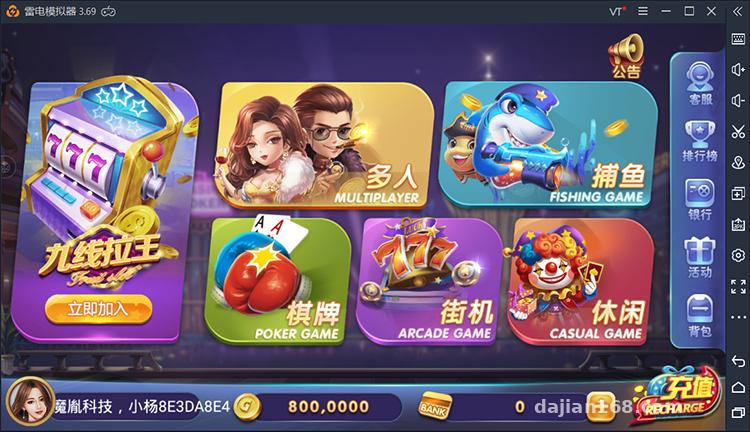
Let’s start with the game content. I went through every module and grouped them into four categories, all of them probability simulations and interactive demos:
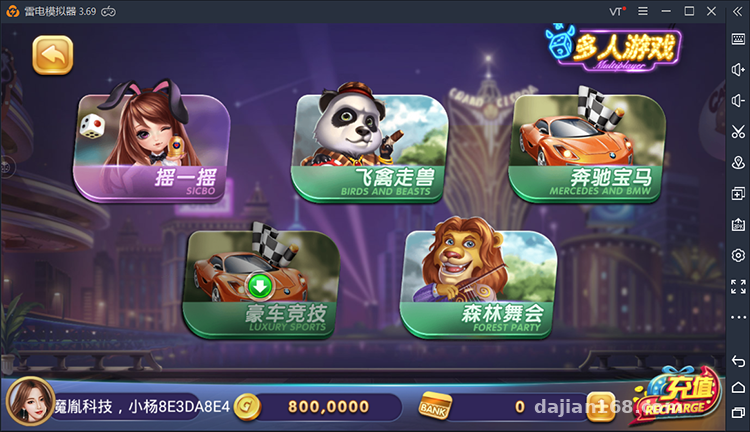
Multiplayer Interactive Modules
Shake-to-Win, Animal Race, Luxury Car Sprint, Sports Car Arena, and Forest Party — five modules that are essentially random-number demos with a multiplayer room mechanism. The room logic is decently written, with reconnection support; in my testing, a dropped connection re-seats you automatically within 5 seconds.
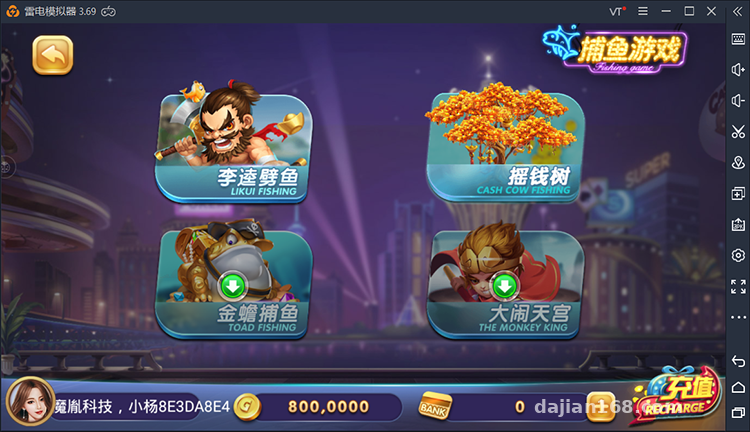
Simulation Demo Modules
Fish Hunter variants like Kui’s Fish Split, Money Tree, Golden Toad Fishing, and Havoc in Heaven are fishing-style demo modules with fairly large animation asset packs — each one runs around 300MB. I’d recommend putting the assets on a CDN during deployment, otherwise the client’s first load takes forever. I didn’t separate them the first time, and the Android build took nearly two minutes to finish loading.
Card Battle Demo Modules
Golden Flower, Compare Niu Niu, Hundred-Player Niu Niu, Red vs Black, Four-Player Niu Niu, Two-Player Niu Niu, Happy 30 Seconds, and Dragon Tiger — all card-based probability demo logic. The backend lets you adjust the random distribution parameters, which makes data simulation testing very convenient. I stress-tested the hundred-player room: with 400 concurrent users, server CPU usage was around 35% on a 2-core 4GB machine. It holds up, but I’d suggest 4 cores.
Arcade Simulation Modules
Nine-Line King, Mr. Zombie, Zodiac Legend, Fortune God Arrives, Egyptian Reels, and Water Margin — these are reel-style random demos with the largest resource footprint. The six modules together come close to 2GB, so make sure you have enough disk; at least 50GB on the system drive to start.
Deployment Essentials: Component Breakdown and Environment Setup
The source code is delivered as separate components. My recommended deployment order is: database → game server → backend website → web portal → client packaging. Get the order wrong and you’ll be redoing work — don’t ask how I know.
Environment Requirements
For the server I used CentOS 7.9 with the BT Panel, PHP 7.4, MySQL 5.7. Redis is a must — room state is entirely cached through it, and without Redis the multiplayer rooms crash outright. One gotcha when importing the database: the original SQL file contains foreign key constraints, so run SET FOREIGN_KEY_CHECKS=0 before importing, or the import will break midway.
Backend Website
The backend is written in PHP and more feature-complete than I expected: user management, module toggles, parameter configuration, and statistical reports are all there. The parameter configuration section deserves a special mention — the random distribution, room multiplier demo values, and bot counts for every demo module can be adjusted from the backend. When doing secondary development or teaching demos, this panel is the core entry point. Remember to change the default admin path; even for demo purposes, basic security habits matter.
Client Packaging
The Android side is an Android Studio project — change the package name, swap the icon, update the server address, and you can build. The iOS side is more involved: you need your own developer account to go through TestFlight or enterprise signing. The source is an older Swift-mixed-with-OC structure, and compiling with Xcode 14 or above requires fixing a few deprecated API warnings — not fatal, but it takes patience.
Payments and Secondary Development: The Parts You Can’t Avoid for a Demo Site
The original payment interface is empty or wired to defunct channels. Since mine is purely a demo, I simply changed the top-up entry in the backend to distribute virtual points, and ran the full flow with the data simulation logic. If you want to integrate a real channel, the source code includes a payment gateway abstraction layer — writing an adapter class is enough, and the structure is reasonably clean.
Highlight: the modular design here is well done. Each demo module lives in its own directory, so during secondary development you can take a single module offline without affecting the others — just a one-click toggle in the backend.
As for localization, the original ships with Simplified Chinese only. The language packs sit in the client’s strings resources; translating to Traditional Chinese or English is roughly two to three days of work — the word count isn’t huge. For secondary development, start with the server’s module registry: every game logic entry point is listed there, which beats digging through code.
Who This Is For
Three groups will find this useful: first, people teaching probability algorithms — the random-number demo modules make very intuitive case studies; second, teams prototyping interactive entertainment products, since reskinning the UI is quick; third, source-code site operators taking client work — when a client wants a demo site that’s “feature-rich and lively,” this delivers efficiently. If you’re aiming for a serious commercial project, though, there’s still a lot to add yourself: compliance review and content moderation mechanisms both need to be built in.
FAQ
Q: What’s the minimum server configuration?
A: For demos, 2 cores / 4GB RAM with 50GB disk will run it. For hundred-player room stress tests, go 4 cores / 8GB. Bandwidth matters a lot — if assets aren’t on a CDN, start at 5Mbps.
Q: Do both the Android and iOS clients need repackaging?
A: Yes. The source ships as project files, not a finished APK. Android needs only three config changes; iOS requires a developer account for signing. Without one, debug on Android first.
Q: Can I deploy only some of the game modules?
A: Yes. The backend has module toggles, and the corresponding server directories can be physically removed. I actually enabled only 8 modules for my demo and took the rest offline — it runs very stably.
Q: What if the database import throws errors?
A: Nine times out of ten it’s the foreign key constraints — disable foreign key checks before importing. Also make sure MySQL isn’t older than 5.6; version 5.5 lacks some field types.
Disclaimer: This article is a technical deployment note. All features are for random-number and probability simulation demo purposes only. This article is for technical education only; any deployment and use must comply with applicable laws and regulations.
Disclaimer: This article is for technical education and demonstration only. It is not professional or financial advice. Any real-world deployment must comply with applicable laws and regulations.
#Source Code Setup #Deployment Log #Board Game Simulation #Dual-Platform Clients #Game Backend
-
 Alipay QR Code Scan
-
 WeChat Scan Pay