
ThinkPHP Credit Assessment System Deployment: VIP Subscription & Queue Engine Guide
ThinkPHP Credit Assessment System Deployment: VIP Subscription & Queue Engine Guide
Disclaimer: This article is for technical education and demonstration only. It is not professional or financial advice. Any real-world deployment must comply with applicable laws and regulations.
I recently helped a friend who runs a fintech training program deploy a micro-credit assessment demo system. His team needed a sandbox environment to teach internal risk control and simulate approval workflows. Most similar scripts floating around online have outdated architectures, but this particular package integrates VIP subscriptions, daily check-in incentives, and a settlement queue engine cleanly. Even better, the source code isn’t heavily obfuscated, making it great for secondary development or business workflow demonstrations. While the project is still fresh in my mind, I want to document the deployment process and the logic behind its core modules for other developers looking for a similar setup.

Core Business Features and Code Structure
After unpacking the archive, I checked the directory tree. It is built on the standard ThinkPHP framework, while the frontend uses a mobile-responsive layout that wraps easily into an H5 web app or a hybrid mobile package. Once I got it running on my local machine, I focused my testing on three main business modules.
1. Credit Limit Assessment and Application Workflow
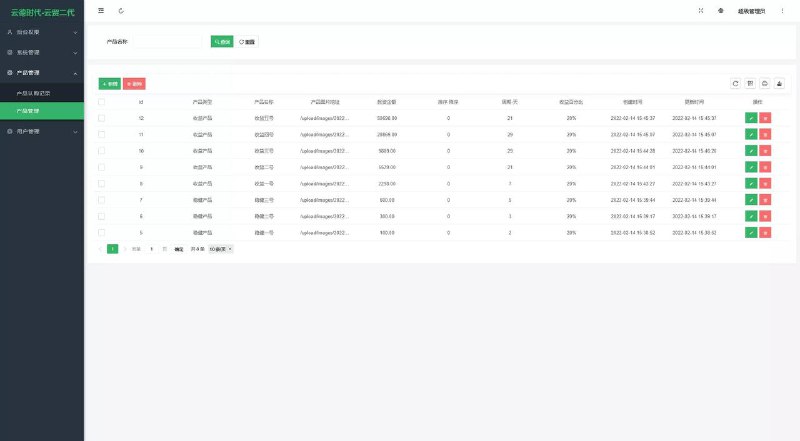
The frontend user experience is very lightweight. After registering, users land on a multi-dimensional data entry screen that simulates a real-world credit profile submission. From the admin panel, you can customize required fields such as basic identity verification and employment details. Once submitted, the system calculates a simulated credit limit based on preset rules. Administrators can also manually step in to adjust approval statuses in the backend, which makes demonstrating a complete credit lifecycle very intuitive.

2. VIP Membership Subscriptions and Tiered Permissions
A complete VIP membership purchasing logic is built right into the core. During testing, I noticed the membership system does more than just slap a badge on a user profile—it ties directly into approval fast-tracks and fee discounts. In the backend, you can freely create VIP tiers, setting custom subscription prices, validity periods, and priority processing weights for each level. For payment processing, the codebase includes ready-made integration files for standard third-party payment gateways as well as native Alipay and WeChat Pay APIs. You just swap in your merchant ID and secret key to get test callbacks running.
3. Daily Check-In Integration and Settlement Queue Engine
This is easily the most interesting module in the entire codebase. In traditional systems, when a user requests a settlement, it just sits in a static backend list waiting for manual review. This system links a dynamic waiting queue directly to daily user check-ins. When a user submits a settlement request, they enter a visual queue and can see their exact spot in line on the frontend. If they log in to complete daily check-ins or upgrade their VIP tier, their queue weight automatically increases, bumping them forward in line. This exact mechanic is super practical for e-commerce pre-orders, loyalty point redemptions, or batched processing workflows.
Developer Note: The queuing algorithm lives in its own isolated Service layer rather than being tightly coupled with the controllers. If you want to rip this queuing feature out and drop it into your own e-commerce store or task management app, you basically only need to tweak two database tables. The refactoring overhead is minimal.

Server Environment Setup and Deployment Gotchas
With the features covered, let’s look at the actual production setup. I used a Tencent Cloud Lighthouse server running CentOS 7.9 for this build, managing the stack through the Baota (aaPanel) control panel. You don’t need massive hardware for this; a 2-core, 4GB RAM instance handles the load without breaking a sweat.
- Web Server: Nginx 1.20 (I recommend Nginx over Apache here for steadier concurrency handling)
- Database: MySQL 5.7 (Make sure to set the character set to utf8mb4, otherwise some frontend icons will render as gibberish)
- PHP Version: PHP 7.3 (Testing showed PHP 7.4 throws deprecation warnings on a few legacy functions; 7.2 or 7.3 is the sweet spot)
- Required Extensions: Redis, fileinfo, sg11 (A few core libraries have lightweight protection, so installing the sg11 loader is mandatory)
URL Rewriting and Running Directory Setup
Don’t try to visit the domain right after uploading the source files to your web root—you will just hit a 404 or 500 error. First, open your site settings in the Baota panel, point the Running Directory to the /public folder, and uncheck the anti-XSS (open_basedir) restriction. Next, switch over to the URL Rewrite tab, select the built-in thinkphp template, and hit save.
Database Import and Cron Job Configuration
After importing the provided SQL file via phpMyAdmin, open the .env or config/database.php file in the root directory and update the database credentials. Here is a classic trap that trips up a lot of beginners: the automatic refreshing of queue positions and the daily reset of check-in statuses rely entirely on Linux Cron jobs. You must add two Shell scripts to the Scheduled Tasks manager in Baota to hit the system’s CLI endpoints at regular intervals. Without those cron jobs running, the frontend queue positions will stay frozen.

Troubleshooting Common Issues (FAQ)
While debugging this script over a few days, I ran into a couple of minor hiccups. Here is a quick Q&A breakdown to save you some troubleshooting time.
Q: The admin login keeps throwing a captcha error, or the captcha image refuses to load at all. How do I fix this?
A: Nine times out of ten, this is a file permission issue. First, verify that the PHP gd library and fileinfo extension are installed. If they are active and the image still won’t show, open the Baota file manager, change the permissions of the project’s runtime directory to 755 or 777, set the owner to www, and clear your browser cache.
Q: A user paid for a VIP upgrade on the frontend, the payment went through, but their membership status didn’t update automatically?
A: That is a textbook asynchronous callback failure. First, double-check that the callback URL (notify_url) in your payment gateway dashboard matches your site. Also, check if you enabled forced HTTPS on your domain. If HTTPS is forced, but your callback URL is hardcoded as HTTP, the POST parameters will get dropped during the redirect. I suggest whitelisting the callback route in your Nginx config so it bypasses the 301 redirect.
Q: The frontend slows down noticeably once the queue table accumulates a large number of records. How can I optimize this?
A: By default, the script queries the MySQL table directly to calculate rankings on the fly. If your simulation data grows past tens of thousands of rows, you should turn on Redis caching. Go to the backend system settings, switch the cache driver from file to redis, and add a composite index on the weight and create_time columns in the queue database table. This will boost query speeds by more than tenfold.
Wrap-Up and Practical Use Cases
All things considered, the code quality of this credit assessment system—complete with VIP subscriptions and a queuing engine—is well above average compared to similar open-source scripts. Beyond serving as a teaching tool for credit approval workflows or internal corporate point calculations, you can easily tweak the frontend text to repurpose it into a batched member pickup system or a reservation queuing platform. As a standard reminder, this technical walkthrough and codebase are strictly for educational research and compliant workflow simulations. Always ensure your deployments adhere to local regulations.
Disclaimer: This article is for technical education and demonstration only. It is not professional or financial advice. Any real-world deployment must comply with applicable laws and regulations.
#Credit Assessment System #Source Code Deployment #Queue Engine #VIP Membership System #ThinkPHP Tutorial
-
 Alipay QR Code Scan
-
 WeChat Scan Pay









![🖼 ✈️ [First Flight Chapter] Gold Futures Micro Trading Core Architecture](https://dajian168.net/wp-content/uploads/2025/08/telegram-img-2025-08-04-6890776c389d7-150x300.jpg)
