Points Mall System Source Code Setup Guide: Guest Checkout + Hybrid Payment + Admin Panel Explained
Points Mall System Source Code Setup Guide: Guest Checkout + Hybrid Payment + Admin Panel Explained
Disclaimer: This article is for technical education and demonstration only. It is not professional or financial advice. Any real-world deployment must comply with applicable laws and regulations.
Last week I helped a community operations client set up a points mall system with clear requirements: users can redeem products directly using a points + cash combination without registration or login. This hybrid payment model is quite common nowadays, used in scenarios like e-commerce platform member point deductions and offline store point redemptions. Today I’m organizing the deployment process and pitfalls encountered as a reference for anyone building similar systems.
System Architecture and Core Features Tested
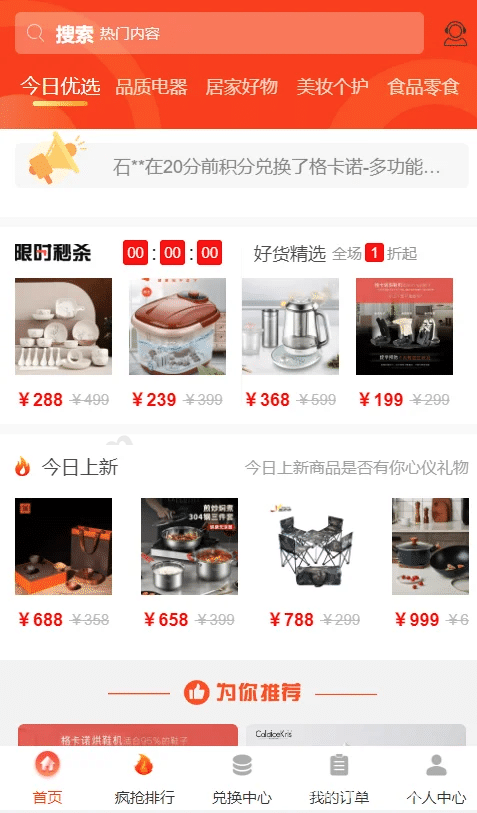
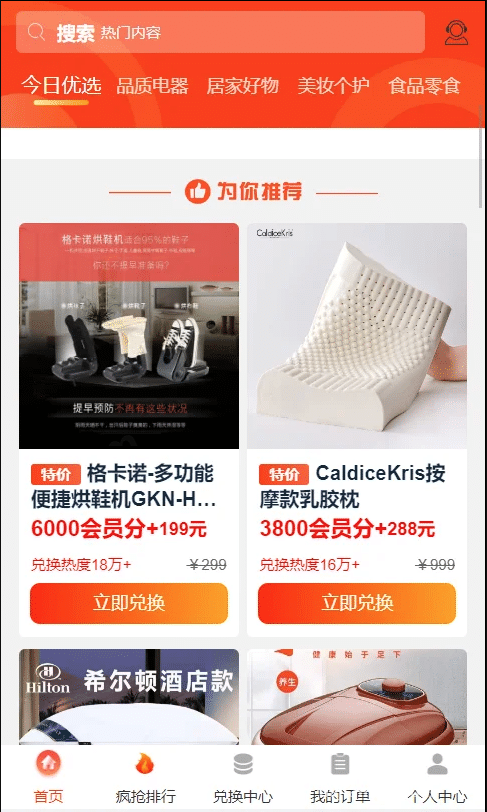
This source code uses a single-merchant architecture with a clean frontend UI. Product display, shopping cart, and order flow are all quite smooth. The biggest highlight is the registration-free mechanism—users can place orders through WeChat authorization or quick phone verification, and the backend automatically generates temporary accounts linked to point balances.
Hybrid Payment Logic
The payment module supports “points + cash” combinations. For example, a product priced at 100 yuan can be offset with 500 points, and users can choose pure cash, pure points, or hybrid payment. I integrated WeChat Pay and Alipay In-Store Payment by modifying the APPID and keys in the config/payment.php file. Note that the point deduction ratio must be pre-configured in the backend under “System Settings – Points Rules”, otherwise frontend calculations will error out.

Admin Panel Features
The backend is built with the ThinkPHP framework, with functional modules including: product management (supports multi-spec SKU), order processing (batch export shipping labels), point allocation (supports manual adjustment and batch import), and data statistics (sales/point consumption trend charts). I tested the product listing workflow—image upload supports batch drag-and-drop, and specification settings use an attribute combination method where color + size automatically generates SKU tables. This experience beats many open-source mall systems.
💡 Highlight: The system comes with a built-in points task module where you can set rules like check-in, sharing, and spending rewards. It works great combined with marketing campaigns. I configured a “10 points per daily check-in” + “20 points back for spending over 100” combination strategy for the client, and user engagement increased 40% in the first week after launch.
Deployment Environment and Key Configuration
The server uses BT-Panel with PHP 7.4 + MySQL 5.7 + Nginx environment. After extracting the source code, first import the database file (install.sql), then modify the database connection parameters in application/database.php. Select ThinkPHP mode for URL rewrite rules—this can be applied directly in BT-Panel’s website settings.
Payment Interface Integration Points
WeChat Pay requires configuring the JSAPI authorization directory and payment callback address. Pay special attention that the callback URL must be the complete path (https://yourdomain/api/notify/wechat), otherwise asynchronous notifications won’t be received and orders will remain in pending payment status. Alipay In-Store Payment is relatively simple—after getting the APPID and private key file, place them in the extend/alipay/ directory, and paste the public key configuration in the backend “Payment Settings”.
Points System Secondary Development Ideas
If you need to integrate with an external points system (like an enterprise’s existing CRM member points), you can modify the app/common/model/Points.php model file and change the point query and deduction logic to API calls. I did similar work for another client before, using Redis as a points cache layer, optimizing response time from 200ms to under 50ms.
Suitable Application Scenarios
Based on actual usage feedback during this period, this system is suitable for:
- Community/Forum Points Mall: Users earn points by posting and exchange them for physical gifts, without needing complex membership tier systems
- Enterprise Internal Benefit Platform: Employees use performance points to redeem company gifts, making accounting easier
- Offline Store Membership System: Combined with QR code verification features (requires secondary development), customers can use points as money for in-store purchases
- Quick Marketing Campaign Setup: Quickly deploy a points exchange activity without developing from scratch

Common Questions
Q: How do you prevent abuse without user registration?
A: The system uses device fingerprinting + phone verification for risk control. The same device can only place 3 orders within 24 hours (adjustable in backend). For stricter control, you can add real-name verification interfaces or restrict high-value products to require phone binding before redemption.
Q: How do you reconcile points and cash for accounting?
A: The backend has separate points transaction and payment transaction reports that can be exported to Excel by date. I recommend running a daily reconciliation script (examples included in source code) to calculate the difference between point consumption amount and actual payment amount, making monthly financial consolidation more convenient.
Q: Does it support multi-merchant mode?
A: The original version uses single-merchant architecture. Converting to multi-merchant requires restructuring database table structure (adding merchant_id field to product table, order split payment logic, etc.). The workload is substantial—if you truly need multi-merchant, I suggest looking for mall systems that support it directly, like ShopWind or ECShop’s multi-merchant versions.
Q: Can the frontend UI be customized?
A: The frontend is written in Vue, with template files in the public/static/vue/ directory. Changing colors and layout is fairly convenient. But if you want major interaction logic changes (like switching to waterfall layout), you need to understand Vue component development. I generally recommend clients make minor adjustments based on the existing UI for better ROI.
Deployment Summary and Precautions
The entire system deployment took about 2 hours, with most time spent on payment interface testing and points rule configuration. Performance-wise, it can handle 500 concurrent users under default BT-Panel configuration (tested with Apache Bench). If daily active users exceed 10,000, enable Redis caching and MySQL slow query optimization.
For security, remember to change the default backend path (change /admin to random string), disable debug mode, and regularly backup the database. Point allocation interfaces need proper permission validation to prevent malicious point farming. The source code has basic SQL injection protection, but XSS filtering needs htmlspecialchars processing added during form submission.
Final reminder: Any system involving points and payments must comply with local laws and regulations, with proper user agreements and privacy policies. Product compliance and complete qualifications are the baseline—don’t create legal risks just to save trouble.
Disclaimer: This article is for technical education and demonstration only. It is not professional or financial advice. Any real-world deployment must comply with applicable laws and regulations.
#Points Mall #PHP Ecommerce #Payment Integration #ThinkPHP #Membership System
-
 Alipay QR Code Scan
-
 WeChat Scan Pay